本文以总账 - 明细账为例,其余系统报表大同小异
原理就是系统报表导出的URL其实在加载报表之后会在js里面,名为ExportUrlBase的属性
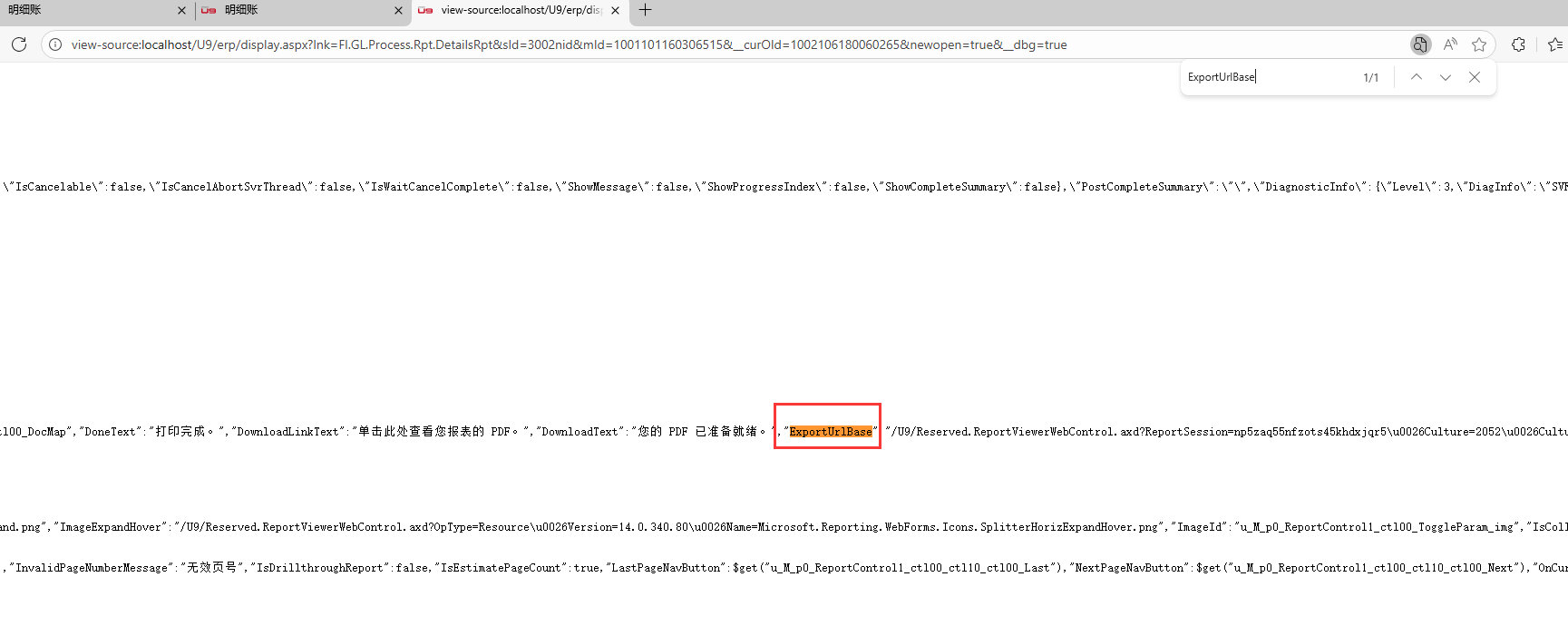
可以自己新窗口打开明细账报表加载数据之后,右键查看源代码,搜索ExportUrlBase,看后面的那一串URL值
对比一下自己点击导出->PDF或者Excel,会发现弹出来的URL地址就是ExportUrlBase属性的值拼接上了PDF或者EXCELOPENXML
因为我的程序只是需要这两种格式,所以也只是适配了这两种,看懂流程跟程序之后可以自行增加
UI插件改变查询方案条件
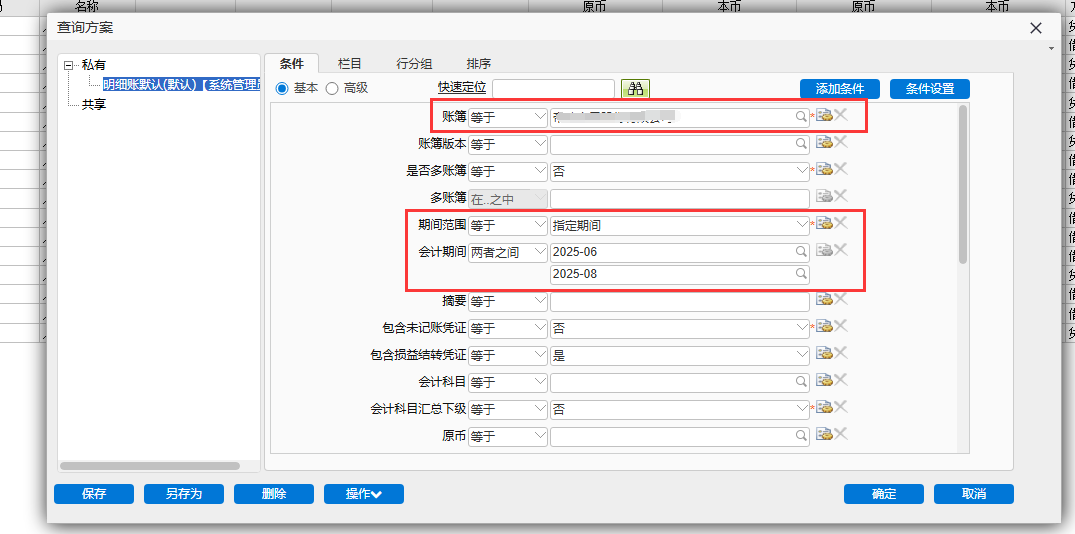
新增查询方案
先给需要UI插件修改的条件给一个默认值(更方便UI插件直接修改)
比如示例:给账簿、会计期间设置默认条件(因为获取报表输出主要还是按组织+会计月)
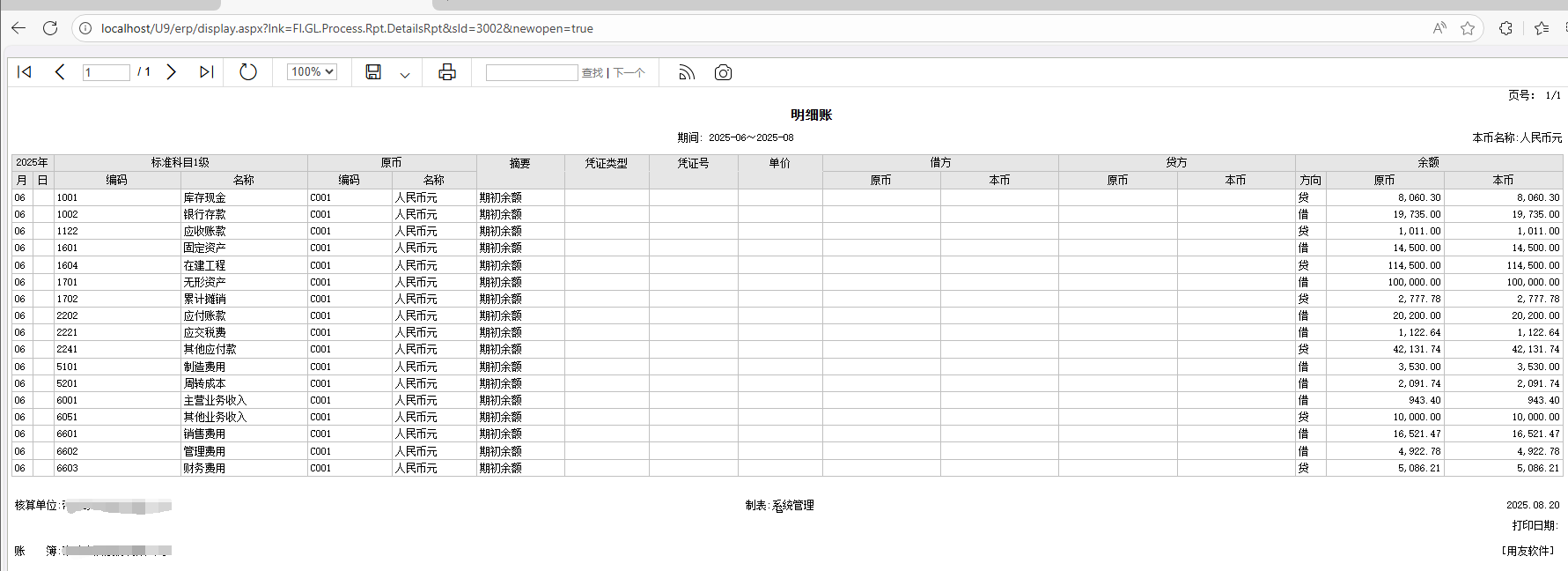
获取报表URL
明细账报表界面新窗口打开可以拿到一串URL
http://localhost/U9/erp/display.aspx?lnk=FI.GL.Process.Rpt.DetailsRpt&sId=3002nid&mId=1001001289685483&__curOId=1001008170100181&newopen=true&__dbg=true
去掉我们不需要的,留下 http://localhost/U9/erp/display.aspx?lnk=FI.GL.Process.Rpt.DetailsRpt&sId=3002&newopen=true (可以另起一个标签页验证能不能打开)
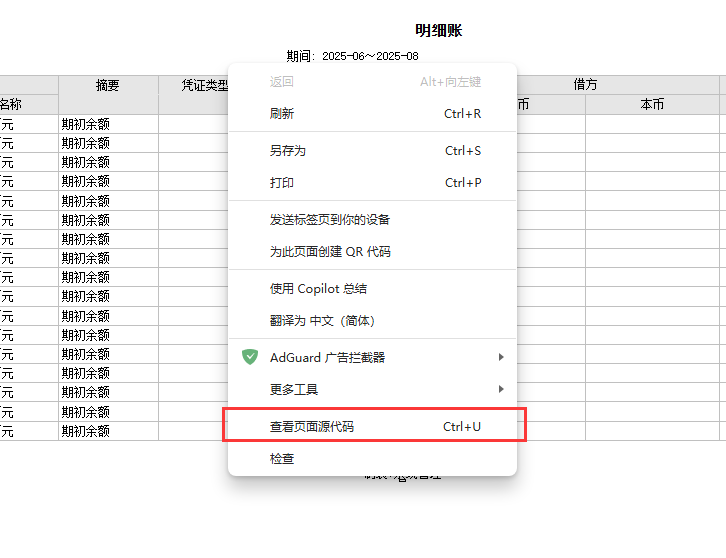
右键查看页面源代码(附)
附:查看到的ExportUrlBase,就是导出的URL
增加自定义条件
通过UI插件改变上面默认查询方案的三个条件
UI插件配置示例
WebPartExtend_ReportFilter.config
<?xml version="1.0" encoding="utf-8" ?>
<configuration>
 <configSections>
  <section name="WebPartExtend" type="UFSoft.UBF.UI.Custom.ExtendedPartSection, UFSoft.UBF.UI.FormProcess" />
 </configSections>

 <WebPartExtend>

    <!-- 总账-明细账 -->
    <ExtendedPart parentPartFullName="UFIDA.U9.GL.DetailsRptUI.DetailsRptUIFormWebPart"
      extendedPartFullName="UFIDA.U9.Cust.XXXX.UIPlugIn.DetailsRptUIPlugIn"
      extendedPartAssemblyName="UFIDA.U9.Cust.XXXX.UIPlugIn.dll">
    </ExtendedPart>

  </WebPartExtend>
</configuration>
UI插件代码
DetailsRptUIPlugIn.cs
ReportID自己去UBF查看,或者调试一下代码,监听变量Part.CurrentState["ReportID"]的值
using System;
using System.Collections.Generic;
using UFIDA.U9.GL.DetailsRptUI;
using UFIDA.UBF.Query.CaseModel;
using UFIDA.UBF.Report.App.UI;
using UFSoft.UBF.Report.Filter.FilterModel;
using UFSoft.UBF.UI.IView;
using UFSoft.UBF.Util.Context;

namespace UFIDA.U9.Cust.XXXX.UIPlugIn
{
    /// <summary>
    /// 明细账
    /// </summary>
    public class DetailsRptUIPlugIn : UFSoft.UBF.UI.Custom.ExtendedPartBase
    {

        private DetailsRptUIFormWebPart _part;
        // Part.CurrentState["ReportID"]
        private readonly string ReportID = "45b4acd1-f251-4140-b030-9d506d6da095";
        private Case myCase = null;

        public override void AfterInit(IPart Part, EventArgs args)
        {
            base.AfterInit(Part, args);
            _part = Part as DetailsRptUIFormWebPart;
            if (_part != null)
            {
                SetMyCase();
            }
        }

        public override void AfterDataLoad(IPart Part)
        {
            base.AfterDataLoad(Part);
            _part = Part as DetailsRptUIFormWebPart;
            if (_part != null)
            {
                ChangeUserCaseFilter();
            }
        }

        private void SetMyCase()
        {
            string caseName = _part.NameValues["CaseName"]?.ToString();
            if (string.IsNullOrEmpty(caseName)) return;
            myCase = Common.Utils.LoadAndEnsureDefaultCase(ReportID, caseName);
        }

        private void ChangeUserCaseFilter()
        {
            if (myCase != null)
            {
                Common.Utils.UpdateUserCaseDisplayNameByCurrentLanguage(_part.Action.CurrentState[ReportCommonAction.UserCaseDefineStateName] as CaseDefine, myCase);

                // 账簿(必须条件,不可能为空)
                FilterValue fvSOB = myCase.FilterValues.GetObjectByName("SOB_Code");
                string vSOB = Common.Utils.GetMainSOBID(ReportAppService.GetLoginOrgID());
                fvSOB.SetValue(0, vSOB);
                // 期间范围(必须条件,不可能为空) 3指定期间
                FilterValue fvPeriodRange = myCase.FilterValues.GetObjectByName("PeriodRange");
                if (fvPeriodRange.GetValue() != "3")
                {
                    fvPeriodRange.SetValue(0, "3");
                }
                // 记账期间
                FilterValue fvAccountingPeriod = myCase.FilterValues.GetObjectByName("AccountingPeriod");
                string v1 = _part.NameValues["AccountingPeriodStart"]?.ToString();
                string v2 = _part.NameValues["AccountingPeriodEnd"]?.ToString();
                if (fvAccountingPeriod == null)
                {
                    fvAccountingPeriod = Common.Utils.CreatePeriod("AccountingPeriod", myCase.FilterValues.Count + 1, UFSoft.UBF.Report.Filter.enuOperatorListType.Between, new List<string>() { v1, v2 });
                    myCase.FilterValues.Add(fvAccountingPeriod);
                }
                else if (fvAccountingPeriod.RelationOperator == UFSoft.UBF.Report.Filter.enuOperatorListType.Between)
                {
                    fvAccountingPeriod.SetValue(0, v1);
                    fvAccountingPeriod.SetValue(1, v2);
                }
                else if (fvAccountingPeriod.RelationOperator == UFSoft.UBF.Report.Filter.enuOperatorListType.Equal)
                {
                    if (v1 == v2) fvAccountingPeriod.SetValue(0, v1);
                }

                Common.Utils.SetCaseModelSession(this._part.Action, ReportID);
                _part.Action.CurrentState["IsCaseChange"] = true;
                _part.Action.CurrentState[ReportCommonAction.UserCaseStateName] = myCase;
            }
        }

    }
}
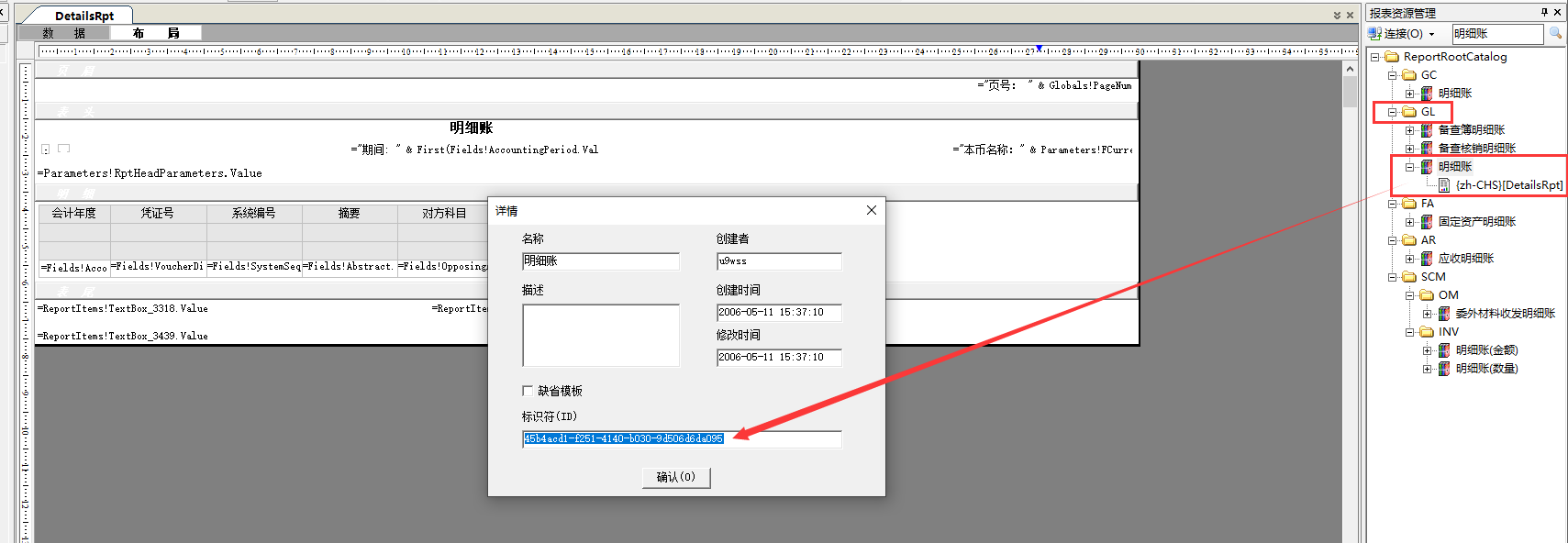
UI插件Common.Utils
using System;
using System.Collections.Generic;
using System.Reflection;
using UFIDA.U9.UI.PDHelper;
using UFIDA.UBF.Query.CaseModel;
using UFIDA.UBF.Report.App.UI;
using UFIDA.UBF.Report.App.UI.CaseManager;
using UFIDA.UBF.Report.App.UI.Interface;
using UFIDA.UBF.Report.App.UI.ProcessStrategy;
using UFSoft.UBF.Report.Filter;
using UFSoft.UBF.Report.Filter.FilterModel;
using UFSoft.UBF.UI;
using UFSoft.UBF.UI.ActionProcess;
using UFSoft.UBF.UI.FormProcess;
using UFSoft.UBF.UI.IView;
using UFSoft.UBF.Util.Context;
using UFSoft.UBF.Util.DataAccess;

namespace UFIDA.U9.Cust.XXXX.UIPlugIn.Common
{
    public class Utils
    {
        /// <summary>
        /// 获取组织的主账簿ID
        /// </summary>
        /// <param name="orgID">组织ID</param>
        /// <returns></returns>
        public static string GetMainSOBID(string orgID)
        {
            string sql = "select ID from Base_SetofBooks where SOBType=0 and Org=" + orgID;
            DataAccessor.RunSQL(DataAccessor.GetConn(), sql, null, out object sobobj);
            return sobobj?.ToString();
        }

        /// <summary>
        /// ReportCommonAction.UpdateUserCaseDisplayNameByCurrentLanguage方法调用
        /// </summary>
        /// <param name="caseDefine"></param>
        /// <param name="userCase"></param>
        public static void UpdateUserCaseDisplayNameByCurrentLanguage(CaseDefine caseDefine, Case userCase)
        {
            // 获取类型
            Type type = typeof(ReportCommonAction);
            // 定义参数类型数组
            Type[] parameterTypes = new Type[] { typeof(CaseDefine), typeof(Case) };
            // 获取方法信息
            MethodInfo methodInfo = type.GetMethod("UpdateUserCaseDisplayNameByCurrentLanguage", BindingFlags.NonPublic | BindingFlags.Static, null, parameterTypes, null);
            if (methodInfo == null) throw new Exception("ReportCommonAction静态方法 UpdateUserCaseDisplayNameByCurrentLanguage 未找到");
            // 调用方法,传递参数
            methodInfo.Invoke(null, new object[] { caseDefine, userCase });
        }

        /// <summary>
        /// ReportCommonAction.SetCaseModelSession方法调用
        /// </summary>
        /// <param name="action"></param>
        /// <param name="reportID">原方法里面这个值是从args获取的,UI插件没有,直接指定</param>
        public static void SetCaseModelSession(BaseAction action, string reportID)
        {
            CaseModel caseModel = new CaseModel();
            caseModel.Case = (action.CurrentState[ReportCommonAction.UserCaseStateName] as Case);
            ReportProcessStrategy reportProcessStrategy = action.CurrentState[ReportAppService.GetReportProcessStrategySessionName()] as ReportProcessStrategy;
            if (reportProcessStrategy != null)
            {
                try
                {
                    caseModel.CaseDefine = reportProcessStrategy.ProcessCaseDefine(caseModel.Case, action.CurrentState[ReportCommonAction.UserCaseDefineStateName] as CaseDefine);
                    ReportDrillHelper.AddExportExcelControlParameter(caseModel.CaseDefine, false);
                    string text = reportProcessStrategy.VerifyUserCaseByCaseDefine(caseModel.CaseDefine, caseModel.Case);
                    if (text.Length > 0)
                    {
                        action.CurrentState["AdjustUserCaseDisplayInfo"] = text;
                    }
                }
                catch (Exception ex)
                {
                    caseModel.CaseDefine = (action.CurrentState[ReportCommonAction.UserCaseDefineStateName] as CaseDefine);
                }
            }
            else
            {
                caseModel.CaseDefine = (action.CurrentState[ReportCommonAction.UserCaseDefineStateName] as CaseDefine);
            }
            caseModel.QryModelID = new Guid(reportID);
            action.CurrentState[ReportAppService.GetInputCaseModelSessionName()] = caseModel;
        }

        /// <summary>
        /// 创建会计期间条件项
        /// </summary>
        /// <param name="name">条件名</param>
        /// <param name="itemID">条件项ID</param>
        /// <param name="relationOperator">关系操作符</param>
        /// <returns></returns>
        public static FilterValue CreatePeriod(string name, int itemID, enuOperatorListType relationOperator, List<string> values)
        {
            FilterValue filterValue = new FilterValue();
            filterValue.Name = name;
            filterValue.FilterItemID = itemID;
            filterValue.RelationOperator = relationOperator;
            filterValue.PageType = enuPageOfInputFilterValueType.basicPage;
            filterValue.ReferenceType = enuReferenceType.reference;
            filterValue.LogicOperator = enuOperatorListType.And;
            filterValue.ValueType = enumFilterValueType.InputValue;
            filterValue.Values = new ValueContext();
            filterValue.Values.Labels.Add(name);
            filterValue.Values.Values = values;
            return filterValue;
        }

        /// <summary>
        /// 创建会计年度条件项,等于
        /// </summary>
        /// <param name="name">条件名</param>
        /// <param name="itemID">条件项ID</param>
        /// <param name="v1"></param>
        /// <returns></returns>
        public static FilterValue CreateAccountingYearEqual(string name, int itemID, string v1)
        {
            FilterValue filterValue = new FilterValue();
            filterValue.Name = name;
            filterValue.FilterItemID = itemID;
            filterValue.RelationOperator = enuOperatorListType.Equal;
            filterValue.PageType = enuPageOfInputFilterValueType.basicPage;
            filterValue.ReferenceType = enuReferenceType.reference;
            filterValue.LogicOperator = enuOperatorListType.And;
            filterValue.ValueType = enumFilterValueType.InputValue;
            filterValue.Values = new ValueContext();
            filterValue.Values.Labels.Add(name);
            filterValue.Values.Values = new List<string>() { v1 };
            return filterValue;
        }

        /// <summary>
        /// 获取当前用户报表的指定查询方案,并确保有一个默认的查询方案
        /// 如果当前用户报表没有默认查询方案,则设置指定查询方案为默认查询方案
        /// </summary>
        /// <param name="reportID">报表ID</param>
        /// <param name="caseName">查询方案名</param>
        /// <returns></returns>
        public static Case LoadAndEnsureDefaultCase(string reportID, string caseName)
        {
            Case myCase = null;
            string userid = PlatformContext.Current.UserID + "#" + ReportAppService.GetLoginOrgID();
            Case defCase = ReportAppService.LoadDefalutCase(reportID, userid);
            // 默认的方案就是要的查询方案
            if (defCase != null && defCase.BasicInfo.Title == caseName)
            {
                myCase = defCase;
            }
            else
            {
                myCase = ReportAppService.LoadCase(reportID, userid, caseName);
                // 这个查询方案不是当前用户创建的(别的用户共享的查询方案)
                // 那就只能是从报表所有的查询方案中匹配
                if (myCase == null)
                {
                    ReportCaseManager caseManager = new ReportCaseManager();
                    var cases = caseManager.LoadCases(reportID); // 报表所有查询方案
                    foreach (Case item in cases)
                    {
                        if (item.BasicInfo.Title == caseName)
                        {
                            myCase = item;
                            break;
                        }
                    }
                }
                if (myCase == null) throw new Exception($"未找到名称【{caseName}】的查询方案!");
                if (defCase == null)
                {
                    // 没有默认查询方案,把当前找到的查询方案设置成默认查询方案
                    SetMyDefaultCase(myCase);
                }
            }
            return myCase;
        }

        /// <summary>
        /// 设置为默认查询方案
        /// </summary>
        /// <param name="case"></param>
        public static void SetMyDefaultCase(Case @case)
        {
            UserCaseInfo userCaseInfo = new UserCaseInfo();
            userCaseInfo.CaseID = @case.BasicInfo.ReportCaseID;
            userCaseInfo.OrgID = Convert.ToInt64(ReportAppService.GetLoginOrgID());
            userCaseInfo.UserID = Convert.ToInt64(PlatformContext.Current.UserID);
            userCaseInfo.UserCaseType = UserCaseType.Default;
            ICaseManager caseManager = new ReportCaseManager();
            caseManager.SetMyDefaultUserCaseInfo(userCaseInfo);
        }
    }
}
报表SSO登录
U9系统自带的auotlogin.aspx拼接的return_url会是以菜单的形式打开,获取iframe难度大
不如仿照SSO登录,直接写一个ReportLogin.aspx,登录后Response.Redirect()
以下为示例的ReportLogin.aspx,可以根据情况个性化
ReportLogin.aspx
ReportLogin.aspx放到C:\yonyou\U9V60\Portal\api\v1目录下
_internalSecureToken是内网请求,所以直接定义了一个固定的值
如果是外网可访问,建议还是生成式token更好
<%@ Page Language="C#" %>
<%@ Import Namespace="UFSoft.UBF.UI.Portal.Components" %>
<%@ Import Namespace="UFSoft.UBF.UI.WebControlAdapter" %>
<%@ Import Namespace="UFSoft.UBF.UI.Portal" %>
<%@ Import Namespace="System.Web.UI" %>
<%@ Import Namespace="System.Web.Configuration" %>
<%@ Import Namespace="System.Text.RegularExpressions" %>
<%@ Import Namespace="System.Web.Security" %>
<%@ Import Namespace="System.Text" %>
<%@ Import Namespace="UFSoft.UBF.Util.Context" %>
<%@ Import Namespace="UFSoft.UBF.UI" %>
<%@ Import Namespace="UFSoft.UBF.UI.IProvider" %>
<%@ Import Namespace="UFSoft.UBF.MVC" %>
<%@ Import Namespace="System.Net" %>
<%@ Import Namespace="System.IO" %>
<%@ Import Namespace="System.Collections.Specialized" %>
<%@ Import Namespace="System.Web" %>


<script runat="server">
    private const string _internalSecureToken = "2FFEAB291D1E7EAF76E94EBE93249C9D";

    private string _username;
    private string _enterpriseId;
    private string _orgID;
    private string _enterpriseName = string.Empty;

    protected void Page_Load(object sender,EventArgs e)
    {
        Login();
    }

    private void Login()
    {
        string receivedToken = Request.QueryString["securetoken"];
        if (string.IsNullOrEmpty(receivedToken) || receivedToken != _internalSecureToken)
        {
            Response.StatusCode = 403; // Forbidden
            Response.Write("错误: 禁止访问。");
            Response.End();
            return;
        }

        _username = Request.QueryString["usercode"];
        _enterpriseId = Request.QueryString["entcode"];
        _orgID = Request.QueryString["org"];

        if (string.IsNullOrEmpty(_username) || string.IsNullOrEmpty(_enterpriseId) || string.IsNullOrEmpty(_orgID))
        {
            Response.StatusCode = 400; // Bad Request
            Response.Write("错误: 缺少 username, enterpriseId, 或 orgID 参数。");
            Response.End();
            return;
        }

        string reportUrl = Request.QueryString["reporttype"];
        if (string.IsNullOrEmpty(reportUrl))
        {
            Response.StatusCode = 400;
            Response.Write("错误: 缺少必需的 reporttype 参数。");
            Response.End();
            return;
        }

        CSUser user = new CSUser();
        user.EnterpriseID = _enterpriseId;
        user.OrgId = _orgID;
        user.Username = _username;
        user.LoginDateTime = DateTime.Now;
        user.IP = this.Page.Request.UserHostAddress;
        user.EnterpriseName = _enterpriseName;
        user.UICulture = "zh-CN";
        bool isToken = true;
        UFSoft.UBF.MVC.Helper.UserAuthHelper.TransferUser(user, "", "", true, isToken);

        try
        {
            UserCredential credential = UFSoft.UBF.UI.Portal.UserManagement.ValidUser(user,isToken);
            if (credential.IsAuthenticated == LoginUserStatus.Success)
            {
                CSContext.Current["AppSettings"] = WebConfigurationManager.AppSettings;
                CSContext.Current["ShowControlsTooltip"] = WebConfigurationManager.AppSettings["ShowControlsTooltip"];
                CSContext.Current["ReferenceDisableClientCache"] = WebConfigurationManager.AppSettings["ReferenceDisableClientCache"];
                CSContext.Current["quickmenusCache"] = null;
                CSContext.Current["_PassWordStrategy"] = credential.PassWordStrategy;
                CSContext.Current["_SearchSessionID"] = Guid.NewGuid().ToString();
                CSContext.Current.OperationDate =  DateTime.Now.Date;
                CSContext.Current.UiDefaultCulture = UFSoft.UBF.UI.Portal.UserManagement.Provider.getDefaultLanByOrg(long.Parse(_orgID));

                if (string.IsNullOrEmpty(CSContext.Current.User.OrgName))
                {
                    CSOrganization csOrg = UFSoft.UBF.UI.Portal.UserManagement.getOrgByID(CSContext.Current.User.OrgId.ToString());
                    CSContext.Current.OrgCode = csOrg.Code;
                    CSContext.Current.User.OrgName = csOrg.Name;
                }
                else
                {
                    CSContext.Current.OrgCode = UFSoft.UBF.UI.Portal.UserManagement.getOrgCode(user.OrgId.ToString());
                }

                SetDefaultTheme(user.OrgId.ToString());
                SaveCookies(user);
                WriteCurrentContext();
                UFSoft.UBF.UI.Portal.UserManagement.UserLogoned(user.Username, CSContext.Current.UserName);

                NameValueCollection incomingParams = new NameValueCollection(Request.QueryString);
                incomingParams.Remove("usercode");
                incomingParams.Remove("username");
                incomingParams.Remove("enterpriseId");
                incomingParams.Remove("entcode");
                incomingParams.Remove("orgID");
                incomingParams.Remove("org");
                incomingParams.Remove("securetoken");
                incomingParams.Remove("reporttype");

                UriBuilder uriBuilder = new UriBuilder(reportUrl);
                NameValueCollection baseParams = HttpUtility.ParseQueryString(uriBuilder.Query);

                baseParams.Add(incomingParams);
                uriBuilder.Query = baseParams.ToString();
                string finalTargetUrl = uriBuilder.ToString();
    Response.Redirect(finalTargetUrl);
            }
        }
        catch (Exception)
        {
            throw;
        }
    }

    private void WriteCurrentContext()
    {
        using (new SystemWritablePolicy())
        {
            PlatformContext.Current.OrgID = CSContext.Current.User.OrgId.ToString();
            PlatformContext.Current.UserID = CSContext.Current.User.UserId.ToString();
            PlatformContext.Current.UserCode = CSContext.Current.User.UserCode as string;
            PlatformContext.Current.UserName = CSContext.Current.User.Username;
            PlatformContext.Current.UserClientIP = CSContext.Current.User.IP;
        }
    }

    private int CookiePeriodPolicy = 7;

    private void SaveCookie(string key, string value)
    {
        this.Page.Response.Cookies[key].Value = Convert.ToBase64String(Encoding.Unicode.GetBytes(value));
        this.Page.Response.Cookies[key].Expires = DateTime.Now.AddDays((double)this.CookiePeriodPolicy);
    }

    private void SaveCookies(CSUser csUser)
    {
        SaveCookie("EnterpriseId", _enterpriseId);
        SaveCookie("SelectedOrg", csUser.OrgId as string);
        SaveCookie("SelectedLan", csUser.UICulture);
        SaveCookie("userName", csUser.Username);
    }

    private string SetDefaultTheme(string orgId)
    {
        string orgDefaultThemeByOrgID = UFSoft.UBF.UI.Portal.UserManagement.GetOrgDefaultThemeByOrgID(Convert.ToInt64(orgId));

        if (((CSContext.Current != null) && (CSContext.Current.User != null)) && (CSContext.Current.User.Profile != null))
        {
            CSContext.Current.User.Profile.Theme = orgDefaultThemeByOrgID;
        }
        return orgDefaultThemeByOrgID;
    }
</script>

<html xmlns="http://www.w3.org/1999/xhtml">
<head id="Head1" runat="server">
</head>
</html>
PuppeteerSharp实现读取html源代码并跳转下载
示例新增了一个ashx一般处理程序来使用PuppeteerSharp
思路有了,可以根据自己的习惯用API或者别的方式,总之这里提供出去的URL才是请求报表输出的入口
PuppeteerSharp程序可以使用Nuget安装最新稳定版2.0
直接获取U9报表文件流有些报表可能会很大导致等待时间长,优化一下路径,分为三个ashx文件
DownloadReport.ashx主要进行SSO登录并解析ExportUrlBase后下载到临时目录
DownloadReportFile.ashx负责访问临时目录的文件,提供下载文件服务
DeleteReportFile.ashx负责删除临时目录的文件,提供删除文件服务
PuppeteerSharp
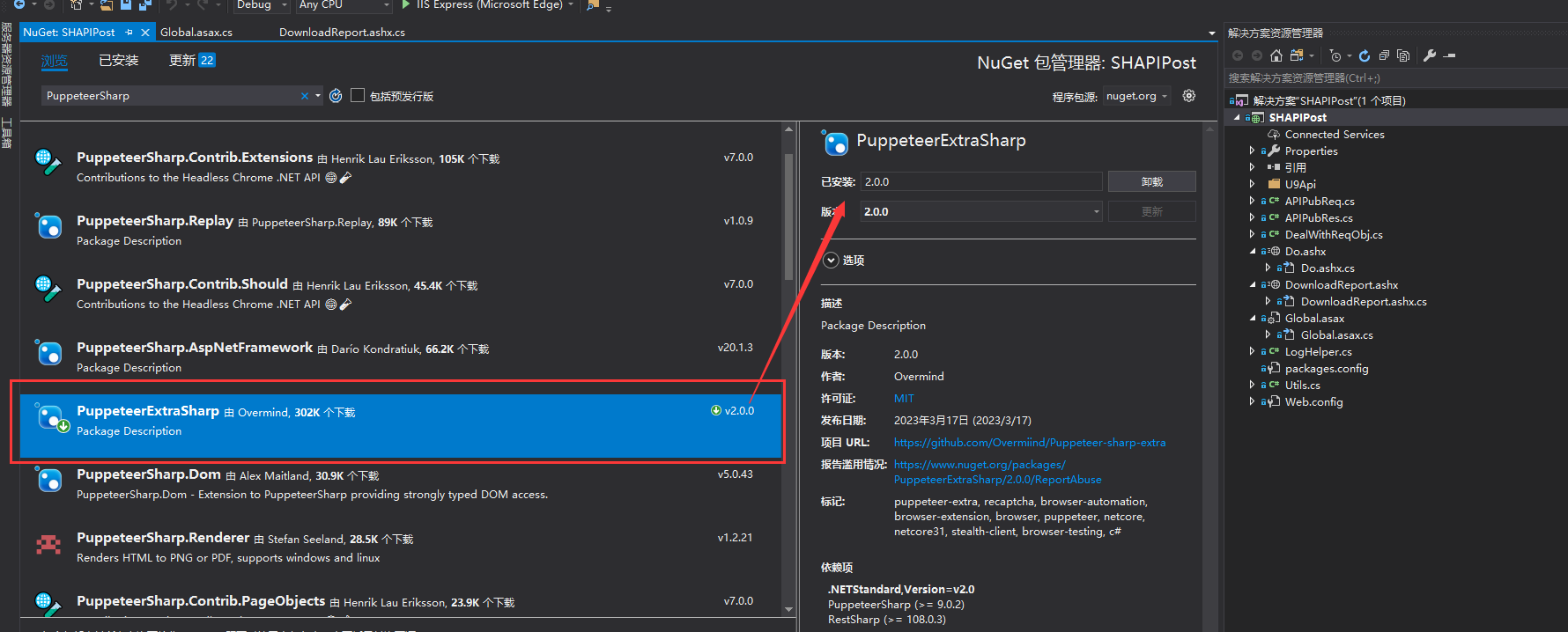
文件下载到临时目录DownloadReport.ashx
ExecutablePath = @"C:\Program Files (x86)\Microsoft\Edge\Application\msedge.exe"
这是edge浏览器,如果服务器没有,那就换成别的
p参数里面包含了timespan,避免URL被获取之后重复拿来使用,失效时间就是web.config配置的ExpirationTimeSeconds,以秒为单位
web.config里面PuppeteerTimeoutMinutes是访问报表URL等待的超时时间,因为报表首次访问会有冷启动,加上系统报表查询时间,最好是设置长一点,这里默认30分钟
web.config配置在下面
using Newtonsoft.Json;
using PuppeteerSharp;
using System;
using System.Collections.Specialized;
using System.Configuration;
using System.Diagnostics;
using System.IO;
using System.Net;
using System.Net.Http;
using System.Security;
using System.Text.RegularExpressions;
using System.Threading.Tasks;
using System.Web;

namespace SHAPIPost
{
    public class DownloadHandler : HttpTaskAsyncHandler
    {
        private static readonly string encryptionKey = ConfigurationManager.AppSettings["EncryptionKey"];
        private static readonly string encryptionIV = ConfigurationManager.AppSettings["EncryptionIV"];
        private static readonly string reportBaseUrl = ConfigurationManager.AppSettings["ReportBaseUrl"];
        private static readonly string loginPageBaseUrl = ConfigurationManager.AppSettings["U9LoginBaseUrl"];
        private static readonly string timeoutSetting = ConfigurationManager.AppSettings["PuppeteerTimeoutMinutes"];
        private static readonly string expirationTimeSeconds = ConfigurationManager.AppSettings["ExpirationTimeSeconds"];

        static DownloadHandler()
        {
            ServicePointManager.SecurityProtocol = SecurityProtocolType.Tls12 | SecurityProtocolType.Tls11 | SecurityProtocolType.Tls;
        }

        // IHttpAsyncHandler 的 IsReusable 属性,我们用 override 实现
        public override bool IsReusable { get { return false; } }

        // 【核心下载逻辑 - 全新改造版】
        public override async Task ProcessRequestAsync(HttpContext context)
        {
            var stopwatch = Stopwatch.StartNew();
            string requestId = context.Request.QueryString["taskID"];
            if (string.IsNullOrEmpty(requestId)) requestId = Guid.NewGuid().ToString("N").Substring(0, 8);
            ReportLogger.Log(requestId, $"请求开始: {context.Request.Url}");

            var Response = context.Response;
            Response.ContentType = "application/json"; // 响应类型改为JSON

            try
            {
                // --- 1. 认证和参数准备 ---
                var authResult = AuthenticateAndPrepare(context);
                string exportType = authResult.ExportType;

                string fileExtension = ".dat";
                if (exportType.Equals("PDF", StringComparison.OrdinalIgnoreCase)) { fileExtension = ".pdf"; }
                else if (exportType.Equals("EXCELOPENXML", StringComparison.OrdinalIgnoreCase)) { fileExtension = ".xlsx"; }
                else if (exportType.Equals("CSV", StringComparison.OrdinalIgnoreCase)) { fileExtension = ".csv"; }

                // 使用GUID确保文件名唯一,避免冲突
                string fileName = $"{authResult.Filename}{fileExtension}";
                string uniqueFileName = $"{authResult.Filename}_{requestId}{fileExtension}";

                // --- 2. 等待报表在服务器端完全生成 ---
                ReportLogger.Log(requestId, $"开始生成报表: {authResult.BrowserLoginUrl}");
                byte[] fileBytes = await GenerateReportBytesAsync(authResult.BrowserLoginUrl, exportType, requestId, context.Server);
                ReportLogger.Log(requestId, $"报表生成完毕,大小: {fileBytes.Length} 字节。");

                // --- 3. 将文件保存到服务器本地目录 ---
                string directoryPath = context.Server.MapPath("~/ReportFiles");
                Directory.CreateDirectory(directoryPath); // 确保目录存在
                string savePath = Path.Combine(directoryPath, uniqueFileName);
                if (File.Exists(savePath)) File.Delete(savePath);

                File.WriteAllBytes(savePath, fileBytes);
                ReportLogger.Log(requestId, $"文件已成功保存至磁盘: {savePath}");

                // --- 4. 构建可访问的URL和返回结果 ---
                var appUrl = HttpContext.Current.Request.Url;
                string baseUrl = $"{appUrl.Scheme}://{appUrl.Authority}{HttpContext.Current.Request.ApplicationPath.TrimEnd('/')}";
                string downloadUrl = $"{baseUrl}/DownloadReportFile.ashx?fileName={HttpUtility.UrlEncode(fileName)}&downName={HttpUtility.UrlEncode(uniqueFileName)}";
                string delUrl = $"{baseUrl}/DeleteReportFile.ashx?delName={HttpUtility.UrlEncode(uniqueFileName)}";

                var result = new
                {
                    IsSuccess = true,
                    Message = "文件生成成功。",
                    Url = downloadUrl,
                    DelUrl = delUrl
                };

                ReportLogger.Log(requestId, "准备向客户端发送JSON响应。");
                Response.Write(JsonConvert.SerializeObject(result));
                ReportLogger.Log(requestId, "已向客户端发送JSON响应。");
            }
            catch (Exception ex)
            {
                ReportLogger.Log(requestId, $"处理失败: {ex.Message} \n {ex.StackTrace}");
                Response.StatusCode = 500;
                var result = new
                {
                    IsSuccess = false,
                    Message = "处理请求时发生错误: " + ex.Message
                };
                Response.Write(JsonConvert.SerializeObject(result));
            }
            finally
            {
                stopwatch.Stop();
                ReportLogger.Log(requestId, $"请求结束,总耗时: {stopwatch.ElapsedMilliseconds} ms");
            }
        }

        private async Task<byte[]> GenerateReportBytesAsync(string browserLoginUrl, string exportType, string requestId, HttpServerUtility Server)
        {
            IBrowser browser = null;
            try
            {
                ReportLogger.Log(requestId, "后台任务开始:启动Puppeteer...");
                int timeoutMinutes = 30;
                if (!string.IsNullOrEmpty(timeoutSetting) && int.TryParse(timeoutSetting, out int parsedTimeout))
                {
                    timeoutMinutes = parsedTimeout;
                }

                browser = await Puppeteer.LaunchAsync(new LaunchOptions
                {
                    Headless = true,
                    IgnoreHTTPSErrors = true,
                    ExecutablePath = @"C:\Program Files (x86)\Microsoft\Edge\Application\msedge.exe"
                });

                IBrowserContext incognitoContext = null;
                try
                {
                    // 1. 创建一个独立的、一次性的隐身浏览器上下文
                    incognitoContext = await browser.CreateIncognitoBrowserContextAsync();
                    ReportLogger.Log(requestId, "后台任务:已创建独立的Incognito上下文。");

                    // 2. 在这个纯净的上下文中创建一个新页面
                    var page = await incognitoContext.NewPageAsync();

                    // 后续所有操作都在这个隔离的页面中进行,不受缓存和Cookie影响
                    ReportLogger.Log(requestId, $"后台任务:Puppeteer访问SSO登录链接: {browserLoginUrl}");
                    page.DefaultNavigationTimeout = timeoutMinutes * 60 * 1000;
                    await page.GoToAsync(browserLoginUrl, new NavigationOptions { WaitUntil = new[] { WaitUntilNavigation.Networkidle0 } });

                    string reportHtml = await page.GetContentAsync();
                    var regex = new Regex("\"ExportUrlBase\":\"([^\"]*)\"");
                    Match match = regex.Match(reportHtml);

                    if (!match.Success)
                    {
                        string debugDir = Server.MapPath("~/ReportDebug");
                        Directory.CreateDirectory(debugDir);
                        string timestamp = DateTime.Now.ToString("yyyyMMddHHmmss");
                        string debugHtmlPath = Path.Combine(debugDir, $"debug_page_{timestamp}.html");
                        File.WriteAllText(debugHtmlPath, reportHtml);
                        throw new Exception($"无法在目标报表页面中解析到导出链接(ExportUrlBase)。已将调试HTML内容保存至 {Path.GetFileName(debugHtmlPath)}。");
                    }

                    string exportUrlBase = Regex.Unescape(match.Groups[1].Value);
                    var reportUri = new Uri(page.Url);
                    string finalDownloadUrl = $"{reportUri.Scheme}://{reportUri.Authority}{exportUrlBase}{exportType}";
                    ReportLogger.Log(requestId, $"后台任务:获取到下载链接,准备下载: {finalDownloadUrl}");

                    var cookies = await page.GetCookiesAsync();
                    var cookieContainer = new CookieContainer();
                    foreach (var cookie in cookies)
                    {
                        cookieContainer.Add(reportUri, new Cookie(cookie.Name, cookie.Value, cookie.Path, cookie.Domain));
                    }

                    using (var handler = new HttpClientHandler { CookieContainer = cookieContainer })
                    using (var client = new HttpClient(handler))
                    {
                        client.Timeout = TimeSpan.FromMinutes(timeoutMinutes);
                        client.DefaultRequestHeaders.Add("User-Agent", "Mozilla/5.0 (Windows NT 10.0; Win64; x64) AppleWebKit/537.36 (KHTML, like Gecko) Chrome/104.0.0.0 Safari/537.36");

                        byte[] fileBytes;
                        // 使用 GetAsync 而不是 GetByteArrayAsync,以便先检查响应头
                        using (var response = await client.GetAsync(finalDownloadUrl, HttpCompletionOption.ResponseHeadersRead))
                        {
                            // 检查 Content-Type
                            var contentType = response.Content.Headers.ContentType?.MediaType ?? string.Empty;
                            if (contentType.Equals("text/html", StringComparison.OrdinalIgnoreCase))
                            {
                                // 如果是HTML,尝试读取内容用于记录日志,然后抛出异常
                                string errorHtml = await response.Content.ReadAsStringAsync();
                                ReportLogger.Log(requestId, $"错误:服务器返回了HTML页面,可能因为会话过期。页面内容预览: {errorHtml.Substring(0, Math.Min(500, errorHtml.Length))}");
                                throw new InvalidDataException("下载失败:服务器返回了HTML错误页面,报表会话可能已过期或服务已重启。");
                            }

                            response.EnsureSuccessStatusCode(); // 检查是否有其他HTTP错误

                            // Content-Type看起来正常,现在下载完整的文件内容
                            fileBytes = await response.Content.ReadAsByteArrayAsync();
                        }

                        if (fileBytes == null || fileBytes.Length == 0)
                        {
                            throw new Exception("文件下载失败,获取到的文件流为空。");
                        }

                        ReportLogger.Log(requestId, $"后台任务:文件下载成功,大小: {fileBytes.Length} 字节。");

                        // 可选,修复文件头
                        if (exportType.Equals("EXCELOPENXML", StringComparison.OrdinalIgnoreCase))
                        {
                            ReportLogger.Log(requestId, $"文件原始大小: {fileBytes.Length} 字节。准备进行修复...");
                            // 调用修复器,获取干净的文件字节流
                            byte[] repairedFileBytes = ExcelRepairer.RepairExcelFile(fileBytes);

                            ReportLogger.Log(requestId, $"文件修复后大小: {repairedFileBytes.Length} 字节。");
                            return repairedFileBytes;
                        }

                        return fileBytes;
                    }

                }
                finally
                {
                    // 3. 确保任务结束后,无论成功或失败,都关闭并销毁这个上下文及其所有数据(缓存、Cookie等)
                    if (incognitoContext != null)
                    {
                        await incognitoContext.CloseAsync();
                        ReportLogger.Log(requestId, "后台任务:Incognito上下文已关闭并清理。");
                    }
                }
            }
            finally
            {
                if (browser != null)
                {
                    // 使用带超时的关闭方式,防止主浏览器进程卡死
                    ReportLogger.Log(requestId, "后台任务:准备关闭主Puppeteer浏览器(带10秒超时)...");
                    var closeTask = browser.CloseAsync();
                    var timeoutTask = Task.Delay(TimeSpan.FromSeconds(10));
                    var completedTask = await Task.WhenAny(closeTask, timeoutTask);
                    if (completedTask == closeTask)
                    {
                        ReportLogger.Log(requestId, "后台任务:主Puppeteer浏览器在10秒内成功关闭。");
                    }
                    else
                    {
                        ReportLogger.Log(requestId, "警告:关闭主Puppeteer浏览器超时(超过10秒),已放弃等待。");
                    }
                }
            }
        }

        private AuthResult AuthenticateAndPrepare(HttpContext context)
        {
            var Request = context.Request;
            var routeData = context.Request.RequestContext.RouteData.Values;
            if (string.IsNullOrEmpty(encryptionKey) || string.IsNullOrEmpty(encryptionIV))
                throw new ConfigurationErrorsException("未在配置中找到 EncryptionKey 或 EncryptionIV 设置。");

            if (string.IsNullOrEmpty(loginPageBaseUrl))
                throw new ConfigurationErrorsException("未在配置中找到 U9LoginBaseUrl 设置。");

            string reportTypeKey = routeData["reporttype"] as string;
            string encryptedPayload = Request.QueryString["p"];
            string filename = Request.QueryString["filename"];
            string exportType = Request.QueryString["exporttype"] ?? "PDF";
            if (string.IsNullOrEmpty(encryptedPayload) || string.IsNullOrEmpty(reportTypeKey))
                throw new ArgumentException("缺少必需的 p 或 reporttype 参数。");
            if (string.IsNullOrEmpty(filename)) filename = reportTypeKey + "_" + DateTime.Now.ToString("yyyyMMddHHmmss");

            string reportTypeLink = ConfigurationManager.AppSettings[reportTypeKey];
            if (string.IsNullOrEmpty(reportTypeLink))
                throw new ConfigurationErrorsException("未在配置中为 reporttype 键 '" + reportTypeKey + "' 找到对应的link配置。");

            string reportUrl = $"{reportBaseUrl}?{reportTypeLink}";
            string decryptedPayload = Utils.DecryptString(encryptedPayload, encryptionKey, encryptionIV);
            if (string.IsNullOrEmpty(decryptedPayload))
                throw new SecurityException("凭证解密失败。");

            NameValueCollection authParams = HttpUtility.ParseQueryString(decryptedPayload);
            string userCode = authParams["usercode"],
                enterpriseId = authParams["entcode"],
                organizationId = authParams["org"],
                timestampStr = authParams["timestamp"];
            if (string.IsNullOrEmpty(userCode) || string.IsNullOrEmpty(enterpriseId) || string.IsNullOrEmpty(organizationId) || string.IsNullOrEmpty(timestampStr))
            {
                throw new ArgumentException("解密后的凭证信息不完整(缺少用户、企业、组织或时间戳)。");
            }

            if (!Utils.IsUnixTimestamp(timestampStr))
            {
                throw new SecurityException("无效的时间戳格式,请使用Unix时间戳。");
            }
            if (!long.TryParse(timestampStr, out long unixTimestamp))
            {
                throw new SecurityException("无效的时间戳格式。");
            }
            int timeoutSeconds = 60;
            if (!string.IsNullOrEmpty(timeoutSetting))
            {
                int.TryParse(expirationTimeSeconds, out timeoutSeconds);
            }
            DateTime requestTime = Utils.UnixTimestampToDateTime(unixTimestamp);
            bool isExpired = Utils.IsTimeExpired(requestTime, timeoutSeconds);
            if (isExpired)
            {
                throw new SecurityException("链接已过期。");
            }

            var uriBuilder = new UriBuilder(loginPageBaseUrl);
            var query = HttpUtility.ParseQueryString(uriBuilder.Query);
            query["usercode"] = userCode;
            query["entcode"] = enterpriseId;
            query["org"] = organizationId;
            query["reporttype"] = reportUrl;
            var originalParams = new NameValueCollection(Request.QueryString);
            originalParams.Remove("p");
            originalParams.Remove("reporttype");
            originalParams.Remove("filename");
            query.Add(originalParams);
            uriBuilder.Query = query.ToString();

            return new AuthResult { BrowserLoginUrl = uriBuilder.ToString(), Filename = filename, ExportType = exportType };
        }
    }

    internal class AuthResult
    {
        public string BrowserLoginUrl { get; set; }
        public string Filename { get; set; }
        public string ExportType { get; set; }
    }

}
文件下载服务DownloadReportFile.ashx
通过中转服务提供对临时目录的文件下载,比直接提供流更稳定
而且有下载的文件存档,能够更方便调试是哪一步出现错误
using System;
using System.IO;
using System.Web;

namespace SHAPIPost
{
    public class DownloadReportFileHandler : IHttpHandler
    {
        public void ProcessRequest(HttpContext context)
        {
            // --- 1. 根据新的URL结构解析参数 ---
            // 用户下载时看到的友好文件名,来自 'fileName' 参数
            string friendlyFileName = context.Request.QueryString["fileName"];
            // 服务器上存储的唯一文件名,来自 'downName' 参数
            string serverFileName = context.Request.QueryString["downName"];

            // 提供一个回退机制,如果友好的fileName参数缺失,则使用服务器文件名
            if (string.IsNullOrWhiteSpace(friendlyFileName))
            {
                friendlyFileName = serverFileName;
            }

            // --- 2. 安全性校验 (使用 serverFileName) ---
            if (string.IsNullOrWhiteSpace(serverFileName))
            {
                context.Response.StatusCode = 400; // Bad Request
                // 注意:根据新的URL结构,现在应该检查 'downName'
                context.Response.StatusDescription = "Missing required 'downName' parameter.";
                context.Response.End();
                return;
            }

            try
            {
                string reportFilesDir = context.Server.MapPath("~/ReportFiles");
                // 使用 serverFileName 在磁盘上查找文件
                string physicalFilePath = Path.Combine(reportFilesDir, serverFileName);

                physicalFilePath = Path.GetFullPath(physicalFilePath);
                if (!physicalFilePath.StartsWith(reportFilesDir, StringComparison.OrdinalIgnoreCase))
                {
                    context.Response.StatusCode = 403; // Forbidden
                    context.Response.StatusDescription = "Access to the requested file is forbidden.";
                    context.Response.End();
                    return;
                }

                if (!File.Exists(physicalFilePath))
                {
                    context.Response.StatusCode = 404; // Not Found
                    context.Response.StatusDescription = "The requested file was not found.";
                    context.Response.End();
                    return;
                }

                // --- 3. 文件流式传输 (使用 friendlyFileName) ---
                context.Response.Clear();
                context.Response.ContentType = GetMimeType(Path.GetExtension(serverFileName));
                // 在 Content-Disposition 中使用 friendlyFileName
                context.Response.AddHeader("Content-Disposition", "attachment; filename=" + HttpUtility.UrlEncode(friendlyFileName, System.Text.Encoding.UTF8));

                context.Response.TransmitFile(physicalFilePath);
                context.Response.Flush();
            }
            catch (Exception)
            {
                context.Response.StatusCode = 500; // Internal Server Error
                context.Response.StatusDescription = "An error occurred while processing your request.";
            }
            finally
            {
                context.Response.End();
            }
        }

        public bool IsReusable => false;

        private string GetMimeType(string extension)
        {
            switch (extension.ToLower())
            {
                case ".pdf": return "application/pdf";
                case ".xlsx": return "application/vnd.openxmlformats-officedocument.spreadsheetml.sheet";
                case ".xls": return "application/vnd.ms-excel";
                case ".csv": return "text/csv";
                default: return "application/octet-stream";
            }
        }
    }
}
文件删除服务DeleteReportFile.ashx
按需调用文件删除服务,比如文件上传到Minio之后的第三方OSS,可以删除本地的留档
也可以在处理文件下载服务之后,配置一个变量控制是否下载后删除,平常都是开启下载后删除,线上有问题的时候,更改配置为关闭下载后删除,方便查看临时目录的原文件是否有问题
using Newtonsoft.Json;
using System;
using System.IO;
using System.Web;

namespace SHAPIPost
{
    public class DeleteReportFileHandler : IHttpHandler
    {
        public void ProcessRequest(HttpContext context)
        {
            context.Response.ContentType = "application/json";

            try
            {
                // 从请求中获取要删除的文件名,推荐使用POST请求体传递
                string fileNameToDelete = context.Request.Form["delName"];
                if (string.IsNullOrEmpty(fileNameToDelete))
                {
                    fileNameToDelete = context.Request.QueryString["delName"];
                }

                if (string.IsNullOrWhiteSpace(fileNameToDelete))
                {
                    throw new ArgumentException("缺少 delName 参数。");
                }

                // --- 安全性校验 ---
                // 1. 获取基础存储目录的物理路径
                string reportFilesDir = context.Server.MapPath("~/ReportFiles");

                // 2. 组合出要删除文件的完整物理路径
                string physicalFileToDelete = Path.Combine(reportFilesDir, fileNameToDelete);

                // 3. 规范化路径以防止路径遍历攻击 (e.g., "..\web.config")
                physicalFileToDelete = Path.GetFullPath(physicalFileToDelete);

                // 4. 【关键】确保要删除的文件确实在我们指定的目录内
                if (!physicalFileToDelete.StartsWith(reportFilesDir, StringComparison.OrdinalIgnoreCase))
                {
                    throw new System.Security.SecurityException("禁止访问指定目录之外的文件。");
                }

                if (File.Exists(physicalFileToDelete))
                {
                    File.Delete(physicalFileToDelete);
                    var successResult = new { IsSuccess = true, Message = $"文件 '{fileNameToDelete}' 已成功删除。" };
                    context.Response.Write(JsonConvert.SerializeObject(successResult));
                }
                else
                {
                    throw new FileNotFoundException($"文件 '{fileNameToDelete}' 不存在。");
                }
            }
            catch (Exception ex)
            {
                var errorResult = new { IsSuccess = false, Message = ex.Message };
                context.Response.Write(JsonConvert.SerializeObject(errorResult));
            }
        }

        public bool IsReusable
        {
            get { return false; }
        }
    }
}
Utils.cs
using System;
using System.Data;
using System.Data.SqlClient;
using System.IO;
using System.Net;
using System.Security.Cryptography;
using System.Text;

namespace SHAPIPost
{
    public static class Utils
    {
        /// <summary>
        /// AES解密
        /// </summary>
        /// <param name="cipherText">密文</param>
        /// <param name="encryptionKey">密钥</param>
        /// <param name="encryptionIV">iv向量</param>
        public static string DecryptString(string cipherText, string encryptionKey, string encryptionIV)
        {
            try
            {
                string base64 = cipherText.Replace('-', '+').Replace('_', '/');
                int padding = base64.Length % 4;
                if (padding != 0)
                {
                    base64 += new string('=', 4 - padding);
                }
                byte[] cipherTextBytes = Convert.FromBase64String(base64);

                using (Aes aesAlg = Aes.Create())
                {
                    aesAlg.Key = Encoding.UTF8.GetBytes(encryptionKey);
                    aesAlg.IV = Encoding.UTF8.GetBytes(encryptionIV);

                    ICryptoTransform decryptor = aesAlg.CreateDecryptor(aesAlg.Key, aesAlg.IV);

                    using (MemoryStream msDecrypt = new MemoryStream(cipherTextBytes))
                    {
                        using (CryptoStream csDecrypt = new CryptoStream(msDecrypt, decryptor, CryptoStreamMode.Read))
                        {
                            using (StreamReader srDecrypt = new StreamReader(csDecrypt))
                            {
                                return srDecrypt.ReadToEnd();
                            }
                        }
                    }
                }
            }
            catch (Exception)
            {
                return null;
            }
        }

        /// <summary>
        /// AES加密
        /// </summary>
        /// <param name="plainText">明文文本</param>
        /// <param name="encryptionKey">密钥</param>
        /// <param name="encryptionIV">iv向量</param>
        public static string EncryptString(string plainText, string encryptionKey, string encryptionIV)
        {
            using (Aes aesAlg = Aes.Create())
            {
                aesAlg.Key = Encoding.UTF8.GetBytes(encryptionKey);
                aesAlg.IV = Encoding.UTF8.GetBytes(encryptionIV);

                ICryptoTransform encryptor = aesAlg.CreateEncryptor(aesAlg.Key, aesAlg.IV);

                using (MemoryStream msEncrypt = new MemoryStream())
                {
                    using (CryptoStream csEncrypt = new CryptoStream(msEncrypt, encryptor, CryptoStreamMode.Write))
                    {
                        using (StreamWriter swEncrypt = new StreamWriter(csEncrypt))
                        {
                            swEncrypt.Write(plainText);
                        }
                        byte[] encrypted = msEncrypt.ToArray();
                        return Convert.ToBase64String(encrypted)
                            .Replace('+', '-')
                            .Replace('/', '_')
                            .TrimEnd('=');
                    }
                }
            }
        }

        /// <summary>
        /// 判断是否为Unix时间戳格式
        /// </summary>
        /// <param name="timestamp">时间戳字符串</param>
        /// <returns>是否为Unix时间戳</returns>
        public static bool IsUnixTimestamp(string timestamp)
        {
            if (long.TryParse(timestamp, out long value))
            {
                // Unix时间戳通常在这个范围内(1970年到2038年左右)
                return value >= 0 && value <= 2147483647;
            }
            return false;
        }

        /// <summary>
        /// 将Unix时间戳转换为DateTime
        /// </summary>
        /// <param name="timestamp">Unix时间戳</param>
        /// <returns>DateTime对象</returns>
        public static DateTime UnixTimestampToDateTime(long timestamp)
        {
            DateTime epoch = new DateTime(1970, 1, 1, 0, 0, 0, DateTimeKind.Utc);
            return epoch.AddSeconds(timestamp);
        }

        /// <summary>
        /// 检查请求时间是否已过期
        /// </summary>
        /// <param name="requestTime">请求时间</param>
        /// <param name="timeoutSeconds">超时秒数</param>
        /// <returns>是否已过期</returns>
        public static bool IsTimeExpired(DateTime requestTime, int timeoutSeconds)
        {
            DateTime currentTime;
            if (requestTime.Kind == DateTimeKind.Utc)
            {
                currentTime = DateTime.UtcNow;
            }
            else
            {
                currentTime = DateTime.Now;
            }

            TimeSpan timeDiff = currentTime - requestTime;
            return Math.Abs(timeDiff.TotalSeconds) > timeoutSeconds;
        }
    }
}
ExcelRepairer.cs
ExcelRepairer处理我们获取报表过程中写入了一些不干净的字节流到文件头,导致excel异常打不开。
此方法依赖于.NET的 ZipArchive 类能够容忍您文件中的损坏程度,并成功枚举出其中的所有条目(entries)。
如果文件的中心目录损坏到连条目列表都无法读取,那么此方法也将失败。
namespace SHAPIPost
{
    using System.IO;
    using System.IO.Compression;

    public static class ExcelRepairer
    {
        /// <summary>
        /// 通过重建ZIP归档的方式,尝试修复一个.xlsx文件。
        /// 此方法可以修复因中心目录与本地文件头元数据不一致(如Length不对)导致的问题。
        /// </summary>
        /// <param name="corruptedFileBytes">原始的、损坏的.xlsx文件字节数组。</param>
        /// <returns>一个新的、结构正确的.xlsx文件字节数组。</returns>
        public static byte[] RepairExcelFile(byte[] corruptedFileBytes)
        {
            // 创建一个内存流用于输出新的、修复后的文件
            using (var outputStream = new MemoryStream())
            {
                // 在输出流上创建一个新的、空的ZIP归档
                using (var destinationArchive = new ZipArchive(outputStream, ZipArchiveMode.Create, true))
                {
                    // 使用输入字节创建一个内存流来读取损坏的文件
                    using (var inputStream = new MemoryStream(corruptedFileBytes))
                    // 以“读取”模式打开损坏的归档,即使它有错误,也希望能读出条目
                    using (var sourceArchive = new ZipArchive(inputStream, ZipArchiveMode.Read))
                    {
                        // 遍历损坏归档中的每一个条目(内部文件)
                        foreach (var sourceEntry in sourceArchive.Entries)
                        {
                            // 在新的归档中,为当前条目创建一个同名的新条目
                            // 我们让.NET自己决定压缩级别等参数
                            var destinationEntry = destinationArchive.CreateEntry(sourceEntry.FullName);

                            // 打开源条目的数据流进行读取
                            using (var sourceStream = sourceEntry.Open())
                            // 打开新条目的数据流进行写入
                            using (var destinationStream = destinationEntry.Open())
                            {
                                // 将原始数据从损坏的归档中完整地复制到新的归档中
                                sourceStream.CopyTo(destinationStream);
                            }
                        }
                    }
                }
                // 当 using (destinationArchive...) 代码块结束时,
                // .NET会自动根据我们实际写入的数据,在文件末尾生成一个全新的、100%正确的中心目录。
                // 这就完成了修复。

                return outputStream.ToArray();
            }
        }
    }
}
ReportLogger.cs
using System;
using System.IO;
using System.Threading.Tasks;
using System.Web;

namespace SHAPIPost
{
    /// <summary>
    /// 轻量级的异步、线程安全日志记录器。
    /// </summary>
    public static class ReportLogger
    {
        private static readonly string LogDirectory = HttpContext.Current.Server.MapPath("~/ReportLogs");
        private static readonly object _lock = new object();

        static ReportLogger()
        {
            try
            {
                Directory.CreateDirectory(LogDirectory);
            }
            catch
            {
                // 忽略在创建目录时发生的错误
            }
        }

        public static void Log(string requestId, string message)
        {
            // 使用 Task.Run 将文件写入操作放入后台线程,避免阻塞主流程
            Task.Run(() =>
            {
                try
                {
                    string logFilePath = Path.Combine(LogDirectory, $"log_{DateTime.Now:yyyy-MM-dd}.txt");
                    string logMessage = $"[{DateTime.Now:yyyy-MM-dd HH:mm:ss.fff}] [RequestID: {requestId}] {message}{Environment.NewLine}";

                    // 使用锁确保多线程写入安全
                    lock (_lock)
                    {
                        File.AppendAllText(logFilePath, logMessage);
                    }
                }
                catch
                {
                    // 忽略日志写入失败
                }
            });
        }
    }
}
web.config
securetoken就是ReportLogin.aspx验证的_internalSecureToken,保持一致即可
<?xml version="1.0" encoding="utf-8"?>
<!--
有关如何配置 ASP.NET 应用程序的详细信息,请访问
https://go.microsoft.com/fwlink/?LinkId=169433
-->
<configuration>
<!--
有关 web.config 更改的说明,请参见 http://go.microsoft.com/fwlink/?LinkId=235367。
可在 <httpRuntime> 标记上设置以下特性。
<system.Web>
<httpRuntime targetFramework="4.8" />
</system.Web>
-->
<system.web>
<compilation debug="true" targetFramework="4.8" />
<!-- 接口超时时间,1800秒=60*30(30分钟,配合报表下载),需要同步修改IIS的超时时间设置 -->
<httpRuntime targetFramework="4.6.1" executionTimeout="1800"/>
</system.web>
<appSettings>
<!-- U9报表SSO登录地址 -->
<add key="U9LoginBaseUrl" value="http://localhost/U9/api/v1/ReportLogin.aspx?securetoken=2FFEAB291D1E7EAF76E94EBE93249C9D" />
<!-- U9报表前缀地址 -->
<add key="ReportBaseUrl" value="http://localhost/U9/erp/display.aspx" />
<!-- p参数AES解密的密钥跟向量 -->
<add key="EncryptionKey" value="106FE9250C1F5FC4A5BAB670EB663AF0" />
<add key="EncryptionIV" value="0C1F5FC4A5BAB670" />
<!-- Puppeteer程序下载报表超时时间,默认30分钟(预防首次报表访问冷启动等待时间长) -->
<add key="PuppeteerTimeoutMinutes" value="30" />
<!-- DownloadReport接口超时时间,60秒 -->
<add key="ExpirationTimeSeconds" value="60"/>
<!-- U9报表类型对应的link地址 -->
<!-- 总账-总账 -->
<add key="FI_GL_Process_Rpt_GeneralLedgerRpt" value="lnk=FI.GL.Process.Rpt.GeneralLedgerRpt&sId=3002&newopen=true" />
<!-- 总账-明细账 -->
<add key="FI_GL_Process_Rpt_DetailsRpt" value="lnk=FI.GL.Process.Rpt.DetailsRpt&sId=3002&newopen=true" />
<!-- 总账-序时账 -->
<add key="FI_GL_Process_Rpt_SequenceBookRpt" value="lnk=FI.GL.Process.Rpt.SequenceBookRpt&sId=3002&newopen=true" />
<!-- 总账-发生额及余额表 -->
<add key="FI_GL_Process_Rpt_TotalBalanceRpt" value="lnk=FI.GL.Process.Rpt.TotalBalanceRpt&sId=3002&newopen=true" />
<!-- 总账-资产明细表 -->
<add key="FA_SubsidiaryLedgerRptMainUIForm" value="lnk=EAM.FA.Report.FA_SubsidiaryLedgerRptMainUIForm&sId=3009&newopen=true" />
</appSettings>
<system.codedom>
<compilers>
<compiler language="c#;cs;csharp" extension=".cs" type="Microsoft.CodeDom.Providers.DotNetCompilerPlatform.CSharpCodeProvider, Microsoft.CodeDom.Providers.DotNetCompilerPlatform, Version=2.0.0.0, Culture=neutral, PublicKeyToken=31bf3856ad364e35" warningLevel="4" compilerOptions="/langversion:default /nowarn:1659;1699;1701" />
<compiler language="vb;vbs;visualbasic;vbscript" extension=".vb" type="Microsoft.CodeDom.Providers.DotNetCompilerPlatform.VBCodeProvider, Microsoft.CodeDom.Providers.DotNetCompilerPlatform, Version=2.0.0.0, Culture=neutral, PublicKeyToken=31bf3856ad364e35" warningLevel="4" compilerOptions="/langversion:default /nowarn:41008 /define:_MYTYPE=\"Web\" /optionInfer+" />
</compilers>
</system.codedom>
<runtime>
<assemblyBinding xmlns="urn:schemas-microsoft-com:asm.v1">
<dependentAssembly>
<assemblyIdentity name="System.Web.Helpers" publicKeyToken="31bf3856ad364e35" />
<bindingRedirect oldVersion="1.0.0.0-3.0.0.0" newVersion="3.0.0.0" />
</dependentAssembly>
<dependentAssembly>
<assemblyIdentity name="System.Web.WebPages" publicKeyToken="31bf3856ad364e35" />
<bindingRedirect oldVersion="1.0.0.0-3.0.0.0" newVersion="3.0.0.0" />
</dependentAssembly>
<dependentAssembly>
<assemblyIdentity name="System.Web.Mvc" publicKeyToken="31bf3856ad364e35" />
<bindingRedirect oldVersion="1.0.0.0-5.3.0.0" newVersion="5.3.0.0" />
</dependentAssembly>
<dependentAssembly>
<assemblyIdentity name="System.Runtime.CompilerServices.Unsafe" publicKeyToken="b03f5f7f11d50a3a" culture="neutral" />
<bindingRedirect oldVersion="0.0.0.0-6.0.0.0" newVersion="6.0.0.0" />
</dependentAssembly>
<dependentAssembly>
<assemblyIdentity name="System.Memory" publicKeyToken="cc7b13ffcd2ddd51" culture="neutral" />
<bindingRedirect oldVersion="0.0.0.0-4.0.1.1" newVersion="4.0.1.1" />
</dependentAssembly>
<dependentAssembly>
<assemblyIdentity name="Microsoft.Extensions.Primitives" publicKeyToken="adb9793829ddae60" culture="neutral" />
<bindingRedirect oldVersion="0.0.0.0-2.2.0.0" newVersion="2.2.0.0" />
</dependentAssembly>
<dependentAssembly>
<assemblyIdentity name="System.Buffers" publicKeyToken="cc7b13ffcd2ddd51" culture="neutral" />
<bindingRedirect oldVersion="0.0.0.0-4.0.3.0" newVersion="4.0.3.0" />
</dependentAssembly>
<dependentAssembly>
<assemblyIdentity name="System.Text.Encodings.Web" publicKeyToken="cc7b13ffcd2ddd51" culture="neutral" />
<bindingRedirect oldVersion="0.0.0.0-6.0.0.0" newVersion="6.0.0.0" />
</dependentAssembly>
<dependentAssembly>
<assemblyIdentity name="Microsoft.Bcl.AsyncInterfaces" publicKeyToken="cc7b13ffcd2ddd51" culture="neutral" />
<bindingRedirect oldVersion="0.0.0.0-5.0.0.0" newVersion="5.0.0.0" />
</dependentAssembly>
<dependentAssembly>
<assemblyIdentity name="System.Threading.Tasks.Extensions" publicKeyToken="cc7b13ffcd2ddd51" culture="neutral" />
<bindingRedirect oldVersion="0.0.0.0-4.2.0.1" newVersion="4.2.0.1" />
</dependentAssembly>
<dependentAssembly>
<assemblyIdentity name="System.Text.Json" publicKeyToken="cc7b13ffcd2ddd51" culture="neutral" />
<bindingRedirect oldVersion="0.0.0.0-5.0.0.1" newVersion="5.0.0.1" />
</dependentAssembly>
</assemblyBinding>
</runtime>
</configuration>
优化访问路由(附加)
通过增加Global.asax文件,自定义路由
从/DownloadReport.ashx?reporttype=FI_GL_Process_Rpt_DetailsRpt&......的形式改为/DownloadReport/FI_GL_Process_Rpt_DetailsRpt?......的形式
using System;
using System.Collections.Generic;
using System.Linq;
using System.Web;
using System.Web.Security;
using System.Web.SessionState;
using System.Web.Routing;      // 核心路由命名空间
using System.Web.Compilation; // 用于 BuildManager
using System.Web.UI;          // 用于 IRouteHandler
using System.Web.Mvc;

namespace SHAPIPost
{
    // 为 .ashx 文件创建一个自定义的路由处理器
    public class AshxRouteHandler : IRouteHandler
    {
        private readonly string _virtualPath;

        public AshxRouteHandler(string virtualPath)
        {
            _virtualPath = virtualPath;
        }

        public IHttpHandler GetHttpHandler(RequestContext requestContext)
        {
            // 使用 BuildManager 从虚拟路径动态创建处理程序实例
            return BuildManager.CreateInstanceFromVirtualPath(
                _virtualPath, typeof(IHttpHandler)) as IHttpHandler;
        }
    }

    public class Global : System.Web.HttpApplication
    {

        protected void Application_Start(object sender, EventArgs e)
        {
            // 在应用程序启动时运行的代码
            RegisterRoutes(RouteTable.Routes);
        }

        void RegisterRoutes(RouteCollection routes)
        {
            // 注册报表下载处理器路由
            routes.Add("DownloadReportHandlerRoute", new Route(
                "DownloadReport/{reporttype}", // 路由模板
                new AshxRouteHandler("~/DownloadReport.ashx") // 目标处理程序
            ));
        }

        protected void Session_Start(object sender, EventArgs e)
        {

        }

        protected void Application_BeginRequest(object sender, EventArgs e)
        {

        }

        protected void Application_AuthenticateRequest(object sender, EventArgs e)
        {

        }

        protected void Application_Error(object sender, EventArgs e)
        {

        }

        protected void Session_End(object sender, EventArgs e)
        {

        }

        protected void Application_End(object sender, EventArgs e)
        {

        }
    }
}
测试程序
使用控制台应用程序测试
我的一般处理程序是发布在8001端口的
using Newtonsoft.Json;
using Newtonsoft.Json.Linq;
using System;
using System.IO;
using System.Net;
using System.Net.Http;
using System.Security.Cryptography;
using System.Text;
using System.Threading;
using System.Threading.Tasks;
namespace 测试用例
{
/// <summary>
/// 带有超时设置的WebClient
/// </summary>
public class WebClientWithTimeout : WebClient
{
public int Timeout { get; set; }
protected override WebRequest GetWebRequest(Uri address)
{
WebRequest wr = base.GetWebRequest(address);
if (wr != null)
{
wr.Timeout = this.Timeout;
}
return wr;
}
}
class Program
{
// 密钥和IV必须与 DownloadReport.ashx 中的完全相同
private const string _encryptionKey = "106FE9250C1F5FC4A5BAB670EB663AF0";
private const string _encryptionIV = "0C1F5FC4A5BAB670";
private static readonly SemaphoreSlim _downloadLimiter = new SemaphoreSlim(50);
private static readonly string BASE_URL = "http://localhost:8001";
static void Main(string[] args)
{
string username = "demo";
string enterpriseId = "666";
string orgID = "1001008170100181"; // 101组织的ID
string orgName = "XXXX公司";
// 明细账
string accPeriodStart = "2025-01";
string accPeriodEnd = "2025-03";
string filename = GetFileName(accPeriodStart, accPeriodEnd, orgName, "明细账");
DateTime epoch = new DateTime(1970, 1, 1, 0, 0, 0, DateTimeKind.Utc);
long timestamp = (long)(DateTime.UtcNow - epoch).TotalSeconds;
string payload = string.Format("usercode={0}&entcode={1}&org={2}×tamp={3}", username, enterpriseId, orgID, timestamp);
string encryptedPayload = EncryptString(payload);
string directDownloadUrl = $"{BASE_URL}/DownloadReport/FI_GL_Process_Rpt_DetailsRpt?p={encryptedPayload}&exporttype={exportType}&filename={filename}&taskID={taskID}&CaseName={caseName}&AccountingPeriodStart={accPeriodStart}&AccountingPeriodEnd={accPeriodEnd}";
DownloadFile(exportType, filename, directDownloadUrl);
// 总账、序时账...其他报表的测试用例
Console.WriteLine("\n按任意键退出...");
Console.ReadKey();
}
/// <summary>
/// 同步下载文件的完整流程
/// </summary>
private static void DownloadFile(string exportType, string filename, string requestUrl)
{
_downloadLimiter.Wait(); // 等待一个空位
try
{
Console.WriteLine($"\n[步骤 1] 请求生成报表: {filename}");
string fileUrl = null;
string filePathToDelete = null;
using (var webClient = new WebClientWithTimeout())
{
webClient.Timeout = 1800000; // 设置30分钟超时
webClient.Encoding = Encoding.UTF8;
// 1. 调用 DownloadReport.ashx 获取下载地址
try
{
string jsonResponse = webClient.DownloadString(requestUrl);
Console.WriteLine($" - 服务器响应: {jsonResponse}");
var result = JsonConvert.DeserializeObject<JObject>(jsonResponse);
if (result.Value<bool>("IsSuccess"))
{
fileUrl = result.Value<string>("Url");
filePathToDelete = result.Value<string>("DelUrl");
Console.WriteLine($" - 成功获取下载地址: {fileUrl}");
}
else
{
Console.WriteLine($" - 错误: {result["Message"]}");
return;
}
}
catch (Exception ex)
{
Console.WriteLine($" - [步骤 1] 失败: {ex.Message}");
return;
}
// 2. 从获取到的URL下载文件
if (!string.IsNullOrEmpty(fileUrl))
{
Console.WriteLine($"\n[步骤 2] 开始从 {fileUrl} 下载文件...");
try
{
string fileExtension = exportType.Equals("PDF", StringComparison.OrdinalIgnoreCase) ? ".pdf" : (exportType.Equals("CSV", StringComparison.OrdinalIgnoreCase) ? ".csv" : ".xlsx");
string fileNameWithExt = $"{filename}{fileExtension}";
string savePath = Path.Combine(AppDomain.CurrentDomain.BaseDirectory, fileNameWithExt);
if (File.Exists(savePath)) File.Delete(savePath);
byte[] fileBytes = webClient.DownloadData(fileUrl);
File.WriteAllBytes(savePath, fileBytes);
Console.WriteLine($" - 下载成功! 文件已保存至: {savePath} (大小: {fileBytes.Length} 字节)");
}
catch (Exception ex)
{
Console.WriteLine($" - [步骤 2] 失败: {ex.Message}");
}
}
// 3. (可选) 删除服务器上的文件
//if (!string.IsNullOrEmpty(filePathToDelete))
//{
// Console.WriteLine($"\n[步骤 3] 请求删除服务器文件: {filePathToDelete}");
// try
// {
// using (var webClient = new System.Net.WebClient())
// {
// webClient.Encoding = System.Text.Encoding.UTF8;
// webClient.DownloadString(filePathToDelete);
// }
// }
// catch (Exception ex)
// {
// Console.WriteLine($" - [步骤 3] 失败: {ex.Message}");
// }
//}
}
}
finally
{
_downloadLimiter.Release(); // 释放一个空位,让其他等待的请求可以进入
}
}
private static string GetFileName(string accPeriodStart, string accPeriodEnd, string orgName, string v)
{
if (accPeriodStart == accPeriodEnd)
{
return $"{orgName} {accPeriodStart}{v}";
}
else
{
return $"{orgName} {accPeriodStart}至{accPeriodEnd}{v}";
}
}
public static string EncryptString(string plainText)
{
using (Aes aesAlg = Aes.Create())
{
aesAlg.Key = Encoding.UTF8.GetBytes(_encryptionKey);
aesAlg.IV = Encoding.UTF8.GetBytes(_encryptionIV);
ICryptoTransform encryptor = aesAlg.CreateEncryptor(aesAlg.Key, aesAlg.IV);
using (MemoryStream msEncrypt = new MemoryStream())
{
using (CryptoStream csEncrypt = new CryptoStream(msEncrypt, encryptor, CryptoStreamMode.Write))
{
using (StreamWriter swEncrypt = new StreamWriter(csEncrypt))
{
swEncrypt.Write(plainText);
}
byte[] encrypted = msEncrypt.ToArray();
// 使用不依赖 System.Web 的方式生成URL安全的Base64字符串
// 这段代码的功能与 HttpServerUtility.UrlTokenEncode 相同
return Convert.ToBase64String(encrypted)
.Replace('+', '-')
.Replace('/', '_')
.TrimEnd('=');
}
}
}
}
}
}
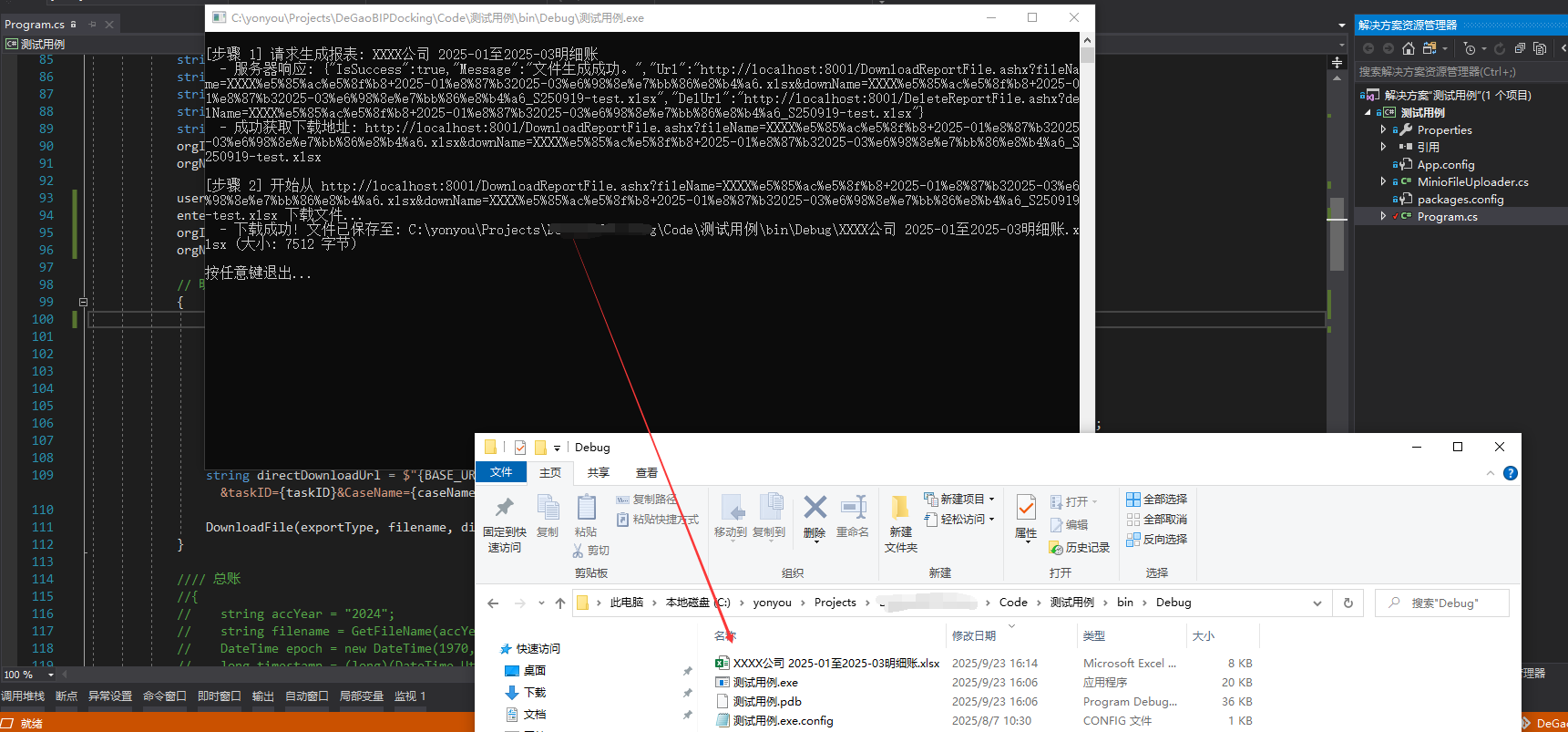
测试结果
输出PDF把exportType=“PDF”即可;
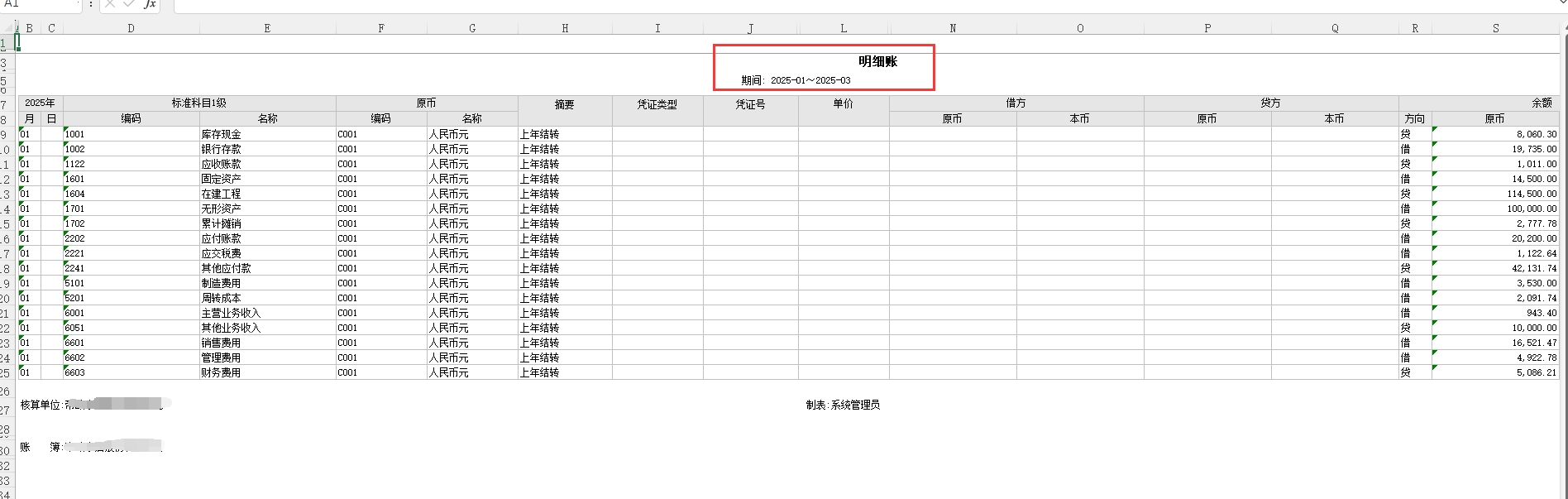
可以看到上面我设置的默认方案是2025-06至2025-08的
输出的excel表已经是按照条件的2025-01至2025-03的



评论