
搜索到
72
篇与
用友U9
的结果
-
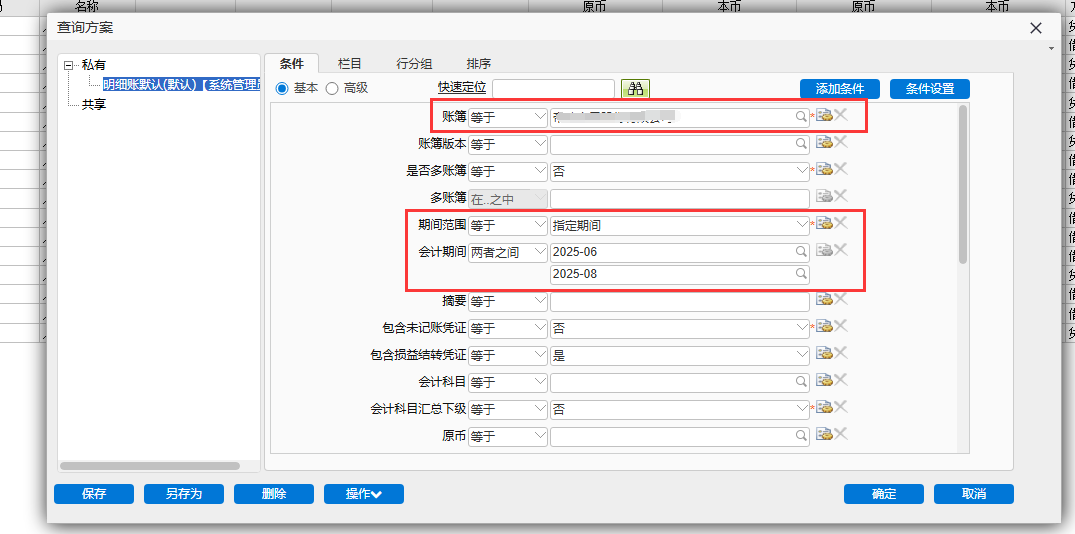
 【061】U9系统报表输出 本文以总账 - 明细账为例,其余系统报表大同小异 原理就是系统报表导出的URL其实在加载报表之后会在js里面,名为ExportUrlBase的属性 可以自己新窗口打开明细账报表加载数据之后,右键查看源代码,搜索ExportUrlBase,看后面的那一串URL值 对比一下自己点击导出->PDF或者Excel,会发现弹出来的URL地址就是ExportUrlBase属性的值拼接上了PDF或者EXCELOPENXML 因为我的程序只是需要这两种格式,所以也只是适配了这两种,看懂流程跟程序之后可以自行增加UI插件改变查询方案条件新增查询方案先给需要UI插件修改的条件给一个默认值(更方便UI插件直接修改) 比如示例:给账簿、会计期间设置默认条件(因为获取报表输出主要还是按组织+会计月)获取报表URL明细账报表界面新窗口打开可以拿到一串URL http://localhost/U9/erp/display.aspx?lnk=FI.GL.Process.Rpt.DetailsRpt&sId=3002nid&mId=1001001289685483&__curOId=1001008170100181&newopen=true&__dbg=true 去掉我们不需要的,留下 http://localhost/U9/erp/display.aspx?lnk=FI.GL.Process.Rpt.DetailsRpt&sId=3002&newopen=true (可以另起一个标签页验证能不能打开)右键查看页面源代码(附)附:查看到的ExportUrlBase,就是导出的URL增加自定义条件通过UI插件改变上面默认查询方案的三个条件UI插件配置示例WebPartExtend_ReportFilter.config<?xml version="1.0" encoding="utf-8" ?> <configuration> <configSections> <section name="WebPartExtend" type="UFSoft.UBF.UI.Custom.ExtendedPartSection, UFSoft.UBF.UI.FormProcess" /> </configSections> <WebPartExtend> <!-- 总账-明细账 --> <ExtendedPart parentPartFullName="UFIDA.U9.GL.DetailsRptUI.DetailsRptUIFormWebPart" extendedPartFullName="UFIDA.U9.Cust.XXXX.UIPlugIn.DetailsRptUIPlugIn" extendedPartAssemblyName="UFIDA.U9.Cust.XXXX.UIPlugIn.dll"> </ExtendedPart> </WebPartExtend> </configuration>UI插件代码DetailsRptUIPlugIn.cs ReportID自己去UBF查看,或者调试一下代码,监听变量Part.CurrentState["ReportID"]的值using System; using System.Collections.Generic; using UFIDA.U9.GL.DetailsRptUI; using UFIDA.UBF.Query.CaseModel; using UFIDA.UBF.Report.App.UI; using UFSoft.UBF.Report.Filter.FilterModel; using UFSoft.UBF.UI.IView; using UFSoft.UBF.Util.Context; namespace UFIDA.U9.Cust.XXXX.UIPlugIn { /// <summary> /// 明细账 /// </summary> public class DetailsRptUIPlugIn : UFSoft.UBF.UI.Custom.ExtendedPartBase { private DetailsRptUIFormWebPart _part; // Part.CurrentState["ReportID"] private readonly string ReportID = "45b4acd1-f251-4140-b030-9d506d6da095"; private Case myCase = null; public override void AfterInit(IPart Part, EventArgs args) { base.AfterInit(Part, args); _part = Part as DetailsRptUIFormWebPart; if (_part != null) { SetMyCase(); } } public override void AfterDataLoad(IPart Part) { base.AfterDataLoad(Part); _part = Part as DetailsRptUIFormWebPart; if (_part != null) { ChangeUserCaseFilter(); } } private void SetMyCase() { string caseName = _part.NameValues["CaseName"]?.ToString(); if (string.IsNullOrEmpty(caseName)) return; myCase = Common.Utils.LoadAndEnsureDefaultCase(ReportID, caseName); } private void ChangeUserCaseFilter() { if (myCase != null) { Common.Utils.UpdateUserCaseDisplayNameByCurrentLanguage(_part.Action.CurrentState[ReportCommonAction.UserCaseDefineStateName] as CaseDefine, myCase); // 账簿(必须条件,不可能为空) FilterValue fvSOB = myCase.FilterValues.GetObjectByName("SOB_Code"); string vSOB = Common.Utils.GetMainSOBID(ReportAppService.GetLoginOrgID()); fvSOB.SetValue(0, vSOB); // 期间范围(必须条件,不可能为空) 3指定期间 FilterValue fvPeriodRange = myCase.FilterValues.GetObjectByName("PeriodRange"); if (fvPeriodRange.GetValue() != "3") { fvPeriodRange.SetValue(0, "3"); } // 记账期间 FilterValue fvAccountingPeriod = myCase.FilterValues.GetObjectByName("AccountingPeriod"); string v1 = _part.NameValues["AccountingPeriodStart"]?.ToString(); string v2 = _part.NameValues["AccountingPeriodEnd"]?.ToString(); if (fvAccountingPeriod == null) { fvAccountingPeriod = Common.Utils.CreatePeriod("AccountingPeriod", myCase.FilterValues.Count + 1, UFSoft.UBF.Report.Filter.enuOperatorListType.Between, new List<string>() { v1, v2 }); myCase.FilterValues.Add(fvAccountingPeriod); } else if (fvAccountingPeriod.RelationOperator == UFSoft.UBF.Report.Filter.enuOperatorListType.Between) { fvAccountingPeriod.SetValue(0, v1); fvAccountingPeriod.SetValue(1, v2); } else if (fvAccountingPeriod.RelationOperator == UFSoft.UBF.Report.Filter.enuOperatorListType.Equal) { if (v1 == v2) fvAccountingPeriod.SetValue(0, v1); } Common.Utils.SetCaseModelSession(this._part.Action, ReportID); _part.Action.CurrentState["IsCaseChange"] = true; _part.Action.CurrentState[ReportCommonAction.UserCaseStateName] = myCase; } } } }UI插件Common.Utilsusing System; using System.Collections.Generic; using System.Reflection; using UFIDA.U9.UI.PDHelper; using UFIDA.UBF.Query.CaseModel; using UFIDA.UBF.Report.App.UI; using UFIDA.UBF.Report.App.UI.CaseManager; using UFIDA.UBF.Report.App.UI.Interface; using UFIDA.UBF.Report.App.UI.ProcessStrategy; using UFSoft.UBF.Report.Filter; using UFSoft.UBF.Report.Filter.FilterModel; using UFSoft.UBF.UI; using UFSoft.UBF.UI.ActionProcess; using UFSoft.UBF.UI.FormProcess; using UFSoft.UBF.UI.IView; using UFSoft.UBF.Util.Context; using UFSoft.UBF.Util.DataAccess; namespace UFIDA.U9.Cust.XXXX.UIPlugIn.Common { public class Utils { /// <summary> /// 获取组织的主账簿ID /// </summary> /// <param name="orgID">组织ID</param> /// <returns></returns> public static string GetMainSOBID(string orgID) { string sql = "select ID from Base_SetofBooks where SOBType=0 and Org=" + orgID; DataAccessor.RunSQL(DataAccessor.GetConn(), sql, null, out object sobobj); return sobobj?.ToString(); } /// <summary> /// ReportCommonAction.UpdateUserCaseDisplayNameByCurrentLanguage方法调用 /// </summary> /// <param name="caseDefine"></param> /// <param name="userCase"></param> public static void UpdateUserCaseDisplayNameByCurrentLanguage(CaseDefine caseDefine, Case userCase) { // 获取类型 Type type = typeof(ReportCommonAction); // 定义参数类型数组 Type[] parameterTypes = new Type[] { typeof(CaseDefine), typeof(Case) }; // 获取方法信息 MethodInfo methodInfo = type.GetMethod("UpdateUserCaseDisplayNameByCurrentLanguage", BindingFlags.NonPublic | BindingFlags.Static, null, parameterTypes, null); if (methodInfo == null) throw new Exception("ReportCommonAction静态方法 UpdateUserCaseDisplayNameByCurrentLanguage 未找到"); // 调用方法,传递参数 methodInfo.Invoke(null, new object[] { caseDefine, userCase }); } /// <summary> /// ReportCommonAction.SetCaseModelSession方法调用 /// </summary> /// <param name="action"></param> /// <param name="reportID">原方法里面这个值是从args获取的,UI插件没有,直接指定</param> public static void SetCaseModelSession(BaseAction action, string reportID) { CaseModel caseModel = new CaseModel(); caseModel.Case = (action.CurrentState[ReportCommonAction.UserCaseStateName] as Case); ReportProcessStrategy reportProcessStrategy = action.CurrentState[ReportAppService.GetReportProcessStrategySessionName()] as ReportProcessStrategy; if (reportProcessStrategy != null) { try { caseModel.CaseDefine = reportProcessStrategy.ProcessCaseDefine(caseModel.Case, action.CurrentState[ReportCommonAction.UserCaseDefineStateName] as CaseDefine); ReportDrillHelper.AddExportExcelControlParameter(caseModel.CaseDefine, false); string text = reportProcessStrategy.VerifyUserCaseByCaseDefine(caseModel.CaseDefine, caseModel.Case); if (text.Length > 0) { action.CurrentState["AdjustUserCaseDisplayInfo"] = text; } } catch (Exception ex) { caseModel.CaseDefine = (action.CurrentState[ReportCommonAction.UserCaseDefineStateName] as CaseDefine); } } else { caseModel.CaseDefine = (action.CurrentState[ReportCommonAction.UserCaseDefineStateName] as CaseDefine); } caseModel.QryModelID = new Guid(reportID); action.CurrentState[ReportAppService.GetInputCaseModelSessionName()] = caseModel; } /// <summary> /// 创建会计期间条件项 /// </summary> /// <param name="name">条件名</param> /// <param name="itemID">条件项ID</param> /// <param name="relationOperator">关系操作符</param> /// <returns></returns> public static FilterValue CreatePeriod(string name, int itemID, enuOperatorListType relationOperator, List<string> values) { FilterValue filterValue = new FilterValue(); filterValue.Name = name; filterValue.FilterItemID = itemID; filterValue.RelationOperator = relationOperator; filterValue.PageType = enuPageOfInputFilterValueType.basicPage; filterValue.ReferenceType = enuReferenceType.reference; filterValue.LogicOperator = enuOperatorListType.And; filterValue.ValueType = enumFilterValueType.InputValue; filterValue.Values = new ValueContext(); filterValue.Values.Labels.Add(name); filterValue.Values.Values = values; return filterValue; } /// <summary> /// 创建会计年度条件项,等于 /// </summary> /// <param name="name">条件名</param> /// <param name="itemID">条件项ID</param> /// <param name="v1"></param> /// <returns></returns> public static FilterValue CreateAccountingYearEqual(string name, int itemID, string v1) { FilterValue filterValue = new FilterValue(); filterValue.Name = name; filterValue.FilterItemID = itemID; filterValue.RelationOperator = enuOperatorListType.Equal; filterValue.PageType = enuPageOfInputFilterValueType.basicPage; filterValue.ReferenceType = enuReferenceType.reference; filterValue.LogicOperator = enuOperatorListType.And; filterValue.ValueType = enumFilterValueType.InputValue; filterValue.Values = new ValueContext(); filterValue.Values.Labels.Add(name); filterValue.Values.Values = new List<string>() { v1 }; return filterValue; } /// <summary> /// 获取当前用户报表的指定查询方案,并确保有一个默认的查询方案 /// 如果当前用户报表没有默认查询方案,则设置指定查询方案为默认查询方案 /// </summary> /// <param name="reportID">报表ID</param> /// <param name="caseName">查询方案名</param> /// <returns></returns> public static Case LoadAndEnsureDefaultCase(string reportID, string caseName) { Case myCase = null; string userid = PlatformContext.Current.UserID + "#" + ReportAppService.GetLoginOrgID(); Case defCase = ReportAppService.LoadDefalutCase(reportID, userid); // 默认的方案就是要的查询方案 if (defCase != null && defCase.BasicInfo.Title == caseName) { myCase = defCase; } else { myCase = ReportAppService.LoadCase(reportID, userid, caseName); // 这个查询方案不是当前用户创建的(别的用户共享的查询方案) // 那就只能是从报表所有的查询方案中匹配 if (myCase == null) { ReportCaseManager caseManager = new ReportCaseManager(); var cases = caseManager.LoadCases(reportID); // 报表所有查询方案 foreach (Case item in cases) { if (item.BasicInfo.Title == caseName) { myCase = item; break; } } } if (myCase == null) throw new Exception($"未找到名称【{caseName}】的查询方案!"); if (defCase == null) { // 没有默认查询方案,把当前找到的查询方案设置成默认查询方案 SetMyDefaultCase(myCase); } } return myCase; } /// <summary> /// 设置为默认查询方案 /// </summary> /// <param name="case"></param> public static void SetMyDefaultCase(Case @case) { UserCaseInfo userCaseInfo = new UserCaseInfo(); userCaseInfo.CaseID = @case.BasicInfo.ReportCaseID; userCaseInfo.OrgID = Convert.ToInt64(ReportAppService.GetLoginOrgID()); userCaseInfo.UserID = Convert.ToInt64(PlatformContext.Current.UserID); userCaseInfo.UserCaseType = UserCaseType.Default; ICaseManager caseManager = new ReportCaseManager(); caseManager.SetMyDefaultUserCaseInfo(userCaseInfo); } } }报表SSO登录U9系统自带的auotlogin.aspx拼接的return_url会是以菜单的形式打开,获取iframe难度大 不如仿照SSO登录,直接写一个ReportLogin.aspx,登录后Response.Redirect() 以下为示例的ReportLogin.aspx,可以根据情况个性化ReportLogin.aspxReportLogin.aspx放到C:\yonyou\U9V60\Portal\api\v1目录下 _internalSecureToken是内网请求,所以直接定义了一个固定的值 如果是外网可访问,建议还是生成式token更好<%@ Page Language="C#" %> <%@ Import Namespace="UFSoft.UBF.UI.Portal.Components" %> <%@ Import Namespace="UFSoft.UBF.UI.WebControlAdapter" %> <%@ Import Namespace="UFSoft.UBF.UI.Portal" %> <%@ Import Namespace="System.Web.UI" %> <%@ Import Namespace="System.Web.Configuration" %> <%@ Import Namespace="System.Text.RegularExpressions" %> <%@ Import Namespace="System.Web.Security" %> <%@ Import Namespace="System.Text" %> <%@ Import Namespace="UFSoft.UBF.Util.Context" %> <%@ Import Namespace="UFSoft.UBF.UI" %> <%@ Import Namespace="UFSoft.UBF.UI.IProvider" %> <%@ Import Namespace="UFSoft.UBF.MVC" %> <%@ Import Namespace="System.Net" %> <%@ Import Namespace="System.IO" %> <%@ Import Namespace="System.Collections.Specialized" %> <%@ Import Namespace="System.Web" %> <script runat="server"> private const string _internalSecureToken = "2FFEAB291D1E7EAF76E94EBE93249C9D"; private string _username; private string _enterpriseId; private string _orgID; private string _enterpriseName = string.Empty; protected void Page_Load(object sender,EventArgs e) { Login(); } private void Login() { string receivedToken = Request.QueryString["securetoken"]; if (string.IsNullOrEmpty(receivedToken) || receivedToken != _internalSecureToken) { Response.StatusCode = 403; // Forbidden Response.Write("错误: 禁止访问。"); Response.End(); return; } _username = Request.QueryString["usercode"]; _enterpriseId = Request.QueryString["entcode"]; _orgID = Request.QueryString["org"]; if (string.IsNullOrEmpty(_username) || string.IsNullOrEmpty(_enterpriseId) || string.IsNullOrEmpty(_orgID)) { Response.StatusCode = 400; // Bad Request Response.Write("错误: 缺少 username, enterpriseId, 或 orgID 参数。"); Response.End(); return; } string reportUrl = Request.QueryString["reporttype"]; if (string.IsNullOrEmpty(reportUrl)) { Response.StatusCode = 400; Response.Write("错误: 缺少必需的 reporttype 参数。"); Response.End(); return; } CSUser user = new CSUser(); user.EnterpriseID = _enterpriseId; user.OrgId = _orgID; user.Username = _username; user.LoginDateTime = DateTime.Now; user.IP = this.Page.Request.UserHostAddress; user.EnterpriseName = _enterpriseName; user.UICulture = "zh-CN"; bool isToken = true; UFSoft.UBF.MVC.Helper.UserAuthHelper.TransferUser(user, "", "", true, isToken); try { UserCredential credential = UFSoft.UBF.UI.Portal.UserManagement.ValidUser(user,isToken); if (credential.IsAuthenticated == LoginUserStatus.Success) { CSContext.Current["AppSettings"] = WebConfigurationManager.AppSettings; CSContext.Current["ShowControlsTooltip"] = WebConfigurationManager.AppSettings["ShowControlsTooltip"]; CSContext.Current["ReferenceDisableClientCache"] = WebConfigurationManager.AppSettings["ReferenceDisableClientCache"]; CSContext.Current["quickmenusCache"] = null; CSContext.Current["_PassWordStrategy"] = credential.PassWordStrategy; CSContext.Current["_SearchSessionID"] = Guid.NewGuid().ToString(); CSContext.Current.OperationDate = DateTime.Now.Date; CSContext.Current.UiDefaultCulture = UFSoft.UBF.UI.Portal.UserManagement.Provider.getDefaultLanByOrg(long.Parse(_orgID)); if (string.IsNullOrEmpty(CSContext.Current.User.OrgName)) { CSOrganization csOrg = UFSoft.UBF.UI.Portal.UserManagement.getOrgByID(CSContext.Current.User.OrgId.ToString()); CSContext.Current.OrgCode = csOrg.Code; CSContext.Current.User.OrgName = csOrg.Name; } else { CSContext.Current.OrgCode = UFSoft.UBF.UI.Portal.UserManagement.getOrgCode(user.OrgId.ToString()); } SetDefaultTheme(user.OrgId.ToString()); SaveCookies(user); WriteCurrentContext(); UFSoft.UBF.UI.Portal.UserManagement.UserLogoned(user.Username, CSContext.Current.UserName); NameValueCollection incomingParams = new NameValueCollection(Request.QueryString); incomingParams.Remove("usercode"); incomingParams.Remove("username"); incomingParams.Remove("enterpriseId"); incomingParams.Remove("entcode"); incomingParams.Remove("orgID"); incomingParams.Remove("org"); incomingParams.Remove("securetoken"); incomingParams.Remove("reporttype"); UriBuilder uriBuilder = new UriBuilder(reportUrl); NameValueCollection baseParams = HttpUtility.ParseQueryString(uriBuilder.Query); baseParams.Add(incomingParams); uriBuilder.Query = baseParams.ToString(); string finalTargetUrl = uriBuilder.ToString(); Response.Redirect(finalTargetUrl); } } catch (Exception) { throw; } } private void WriteCurrentContext() { using (new SystemWritablePolicy()) { PlatformContext.Current.OrgID = CSContext.Current.User.OrgId.ToString(); PlatformContext.Current.UserID = CSContext.Current.User.UserId.ToString(); PlatformContext.Current.UserCode = CSContext.Current.User.UserCode as string; PlatformContext.Current.UserName = CSContext.Current.User.Username; PlatformContext.Current.UserClientIP = CSContext.Current.User.IP; } } private int CookiePeriodPolicy = 7; private void SaveCookie(string key, string value) { this.Page.Response.Cookies[key].Value = Convert.ToBase64String(Encoding.Unicode.GetBytes(value)); this.Page.Response.Cookies[key].Expires = DateTime.Now.AddDays((double)this.CookiePeriodPolicy); } private void SaveCookies(CSUser csUser) { SaveCookie("EnterpriseId", _enterpriseId); SaveCookie("SelectedOrg", csUser.OrgId as string); SaveCookie("SelectedLan", csUser.UICulture); SaveCookie("userName", csUser.Username); } private string SetDefaultTheme(string orgId) { string orgDefaultThemeByOrgID = UFSoft.UBF.UI.Portal.UserManagement.GetOrgDefaultThemeByOrgID(Convert.ToInt64(orgId)); if (((CSContext.Current != null) && (CSContext.Current.User != null)) && (CSContext.Current.User.Profile != null)) { CSContext.Current.User.Profile.Theme = orgDefaultThemeByOrgID; } return orgDefaultThemeByOrgID; } </script> <html xmlns="http://www.w3.org/1999/xhtml"> <head id="Head1" runat="server"> </head> </html>PuppeteerSharp实现读取html源代码并跳转下载示例新增了一个ashx一般处理程序来使用PuppeteerSharp 思路有了,可以根据自己的习惯用API或者别的方式,总之这里提供出去的URL才是请求报表输出的入口 PuppeteerSharp程序可以使用Nuget安装最新稳定版2.0 直接获取U9报表文件流有些报表可能会很大导致等待时间长,优化一下路径,分为三个ashx文件 DownloadReport.ashx主要进行SSO登录并解析ExportUrlBase后下载到临时目录 DownloadReportFile.ashx负责访问临时目录的文件,提供下载文件服务 DeleteReportFile.ashx负责删除临时目录的文件,提供删除文件服务PuppeteerSharp文件下载到临时目录DownloadReport.ashxExecutablePath = @"C:\Program Files (x86)\Microsoft\Edge\Application\msedge.exe" 这是edge浏览器,如果服务器没有,那就换成别的 p参数里面包含了timespan,避免URL被获取之后重复拿来使用,失效时间就是web.config配置的ExpirationTimeSeconds,以秒为单位 web.config里面PuppeteerTimeoutMinutes是访问报表URL等待的超时时间,因为报表首次访问会有冷启动,加上系统报表查询时间,最好是设置长一点,这里默认30分钟web.config配置在下面using Newtonsoft.Json; using PuppeteerSharp; using System; using System.Collections.Specialized; using System.Configuration; using System.Diagnostics; using System.IO; using System.Net; using System.Net.Http; using System.Security; using System.Text.RegularExpressions; using System.Threading.Tasks; using System.Web; namespace SHAPIPost { public class DownloadHandler : HttpTaskAsyncHandler { private static readonly string encryptionKey = ConfigurationManager.AppSettings["EncryptionKey"]; private static readonly string encryptionIV = ConfigurationManager.AppSettings["EncryptionIV"]; private static readonly string reportBaseUrl = ConfigurationManager.AppSettings["ReportBaseUrl"]; private static readonly string loginPageBaseUrl = ConfigurationManager.AppSettings["U9LoginBaseUrl"]; private static readonly string timeoutSetting = ConfigurationManager.AppSettings["PuppeteerTimeoutMinutes"]; private static readonly string expirationTimeSeconds = ConfigurationManager.AppSettings["ExpirationTimeSeconds"]; static DownloadHandler() { ServicePointManager.SecurityProtocol = SecurityProtocolType.Tls12 | SecurityProtocolType.Tls11 | SecurityProtocolType.Tls; } // IHttpAsyncHandler 的 IsReusable 属性,我们用 override 实现 public override bool IsReusable { get { return false; } } // 【核心下载逻辑 - 全新改造版】 public override async Task ProcessRequestAsync(HttpContext context) { var stopwatch = Stopwatch.StartNew(); string requestId = context.Request.QueryString["taskID"]; if (string.IsNullOrEmpty(requestId)) requestId = Guid.NewGuid().ToString("N").Substring(0, 8); ReportLogger.Log(requestId, $"请求开始: {context.Request.Url}"); var Response = context.Response; Response.ContentType = "application/json"; // 响应类型改为JSON try { // --- 1. 认证和参数准备 --- var authResult = AuthenticateAndPrepare(context); string exportType = authResult.ExportType; string fileExtension = ".dat"; if (exportType.Equals("PDF", StringComparison.OrdinalIgnoreCase)) { fileExtension = ".pdf"; } else if (exportType.Equals("EXCELOPENXML", StringComparison.OrdinalIgnoreCase)) { fileExtension = ".xlsx"; } else if (exportType.Equals("CSV", StringComparison.OrdinalIgnoreCase)) { fileExtension = ".csv"; } // 使用GUID确保文件名唯一,避免冲突 string fileName = $"{authResult.Filename}{fileExtension}"; string uniqueFileName = $"{authResult.Filename}_{requestId}{fileExtension}"; // --- 2. 等待报表在服务器端完全生成 --- ReportLogger.Log(requestId, $"开始生成报表: {authResult.BrowserLoginUrl}"); byte[] fileBytes = await GenerateReportBytesAsync(authResult.BrowserLoginUrl, exportType, requestId, context.Server); ReportLogger.Log(requestId, $"报表生成完毕,大小: {fileBytes.Length} 字节。"); // --- 3. 将文件保存到服务器本地目录 --- string directoryPath = context.Server.MapPath("~/ReportFiles"); Directory.CreateDirectory(directoryPath); // 确保目录存在 string savePath = Path.Combine(directoryPath, uniqueFileName); if (File.Exists(savePath)) File.Delete(savePath); File.WriteAllBytes(savePath, fileBytes); ReportLogger.Log(requestId, $"文件已成功保存至磁盘: {savePath}"); // --- 4. 构建可访问的URL和返回结果 --- var appUrl = HttpContext.Current.Request.Url; string baseUrl = $"{appUrl.Scheme}://{appUrl.Authority}{HttpContext.Current.Request.ApplicationPath.TrimEnd('/')}"; string downloadUrl = $"{baseUrl}/DownloadReportFile.ashx?fileName={HttpUtility.UrlEncode(fileName)}&downName={HttpUtility.UrlEncode(uniqueFileName)}"; string delUrl = $"{baseUrl}/DeleteReportFile.ashx?delName={HttpUtility.UrlEncode(uniqueFileName)}"; var result = new { IsSuccess = true, Message = "文件生成成功。", Url = downloadUrl, DelUrl = delUrl }; ReportLogger.Log(requestId, "准备向客户端发送JSON响应。"); Response.Write(JsonConvert.SerializeObject(result)); ReportLogger.Log(requestId, "已向客户端发送JSON响应。"); } catch (Exception ex) { ReportLogger.Log(requestId, $"处理失败: {ex.Message} \n {ex.StackTrace}"); Response.StatusCode = 500; var result = new { IsSuccess = false, Message = "处理请求时发生错误: " + ex.Message }; Response.Write(JsonConvert.SerializeObject(result)); } finally { stopwatch.Stop(); ReportLogger.Log(requestId, $"请求结束,总耗时: {stopwatch.ElapsedMilliseconds} ms"); } } private async Task<byte[]> GenerateReportBytesAsync(string browserLoginUrl, string exportType, string requestId, HttpServerUtility Server) { IBrowser browser = null; try { ReportLogger.Log(requestId, "后台任务开始:启动Puppeteer..."); int timeoutMinutes = 30; if (!string.IsNullOrEmpty(timeoutSetting) && int.TryParse(timeoutSetting, out int parsedTimeout)) { timeoutMinutes = parsedTimeout; } browser = await Puppeteer.LaunchAsync(new LaunchOptions { Headless = true, IgnoreHTTPSErrors = true, ExecutablePath = @"C:\Program Files (x86)\Microsoft\Edge\Application\msedge.exe" }); IBrowserContext incognitoContext = null; try { // 1. 创建一个独立的、一次性的隐身浏览器上下文 incognitoContext = await browser.CreateIncognitoBrowserContextAsync(); ReportLogger.Log(requestId, "后台任务:已创建独立的Incognito上下文。"); // 2. 在这个纯净的上下文中创建一个新页面 var page = await incognitoContext.NewPageAsync(); // 后续所有操作都在这个隔离的页面中进行,不受缓存和Cookie影响 ReportLogger.Log(requestId, $"后台任务:Puppeteer访问SSO登录链接: {browserLoginUrl}"); page.DefaultNavigationTimeout = timeoutMinutes * 60 * 1000; await page.GoToAsync(browserLoginUrl, new NavigationOptions { WaitUntil = new[] { WaitUntilNavigation.Networkidle0 } }); string reportHtml = await page.GetContentAsync(); var regex = new Regex("\"ExportUrlBase\":\"([^\"]*)\""); Match match = regex.Match(reportHtml); if (!match.Success) { string debugDir = Server.MapPath("~/ReportDebug"); Directory.CreateDirectory(debugDir); string timestamp = DateTime.Now.ToString("yyyyMMddHHmmss"); string debugHtmlPath = Path.Combine(debugDir, $"debug_page_{timestamp}.html"); File.WriteAllText(debugHtmlPath, reportHtml); throw new Exception($"无法在目标报表页面中解析到导出链接(ExportUrlBase)。已将调试HTML内容保存至 {Path.GetFileName(debugHtmlPath)}。"); } string exportUrlBase = Regex.Unescape(match.Groups[1].Value); var reportUri = new Uri(page.Url); string finalDownloadUrl = $"{reportUri.Scheme}://{reportUri.Authority}{exportUrlBase}{exportType}"; ReportLogger.Log(requestId, $"后台任务:获取到下载链接,准备下载: {finalDownloadUrl}"); var cookies = await page.GetCookiesAsync(); var cookieContainer = new CookieContainer(); foreach (var cookie in cookies) { cookieContainer.Add(reportUri, new Cookie(cookie.Name, cookie.Value, cookie.Path, cookie.Domain)); } using (var handler = new HttpClientHandler { CookieContainer = cookieContainer }) using (var client = new HttpClient(handler)) { client.Timeout = TimeSpan.FromMinutes(timeoutMinutes); client.DefaultRequestHeaders.Add("User-Agent", "Mozilla/5.0 (Windows NT 10.0; Win64; x64) AppleWebKit/537.36 (KHTML, like Gecko) Chrome/104.0.0.0 Safari/537.36"); byte[] fileBytes; // 使用 GetAsync 而不是 GetByteArrayAsync,以便先检查响应头 using (var response = await client.GetAsync(finalDownloadUrl, HttpCompletionOption.ResponseHeadersRead)) { // 检查 Content-Type var contentType = response.Content.Headers.ContentType?.MediaType ?? string.Empty; if (contentType.Equals("text/html", StringComparison.OrdinalIgnoreCase)) { // 如果是HTML,尝试读取内容用于记录日志,然后抛出异常 string errorHtml = await response.Content.ReadAsStringAsync(); ReportLogger.Log(requestId, $"错误:服务器返回了HTML页面,可能因为会话过期。页面内容预览: {errorHtml.Substring(0, Math.Min(500, errorHtml.Length))}"); throw new InvalidDataException("下载失败:服务器返回了HTML错误页面,报表会话可能已过期或服务已重启。"); } response.EnsureSuccessStatusCode(); // 检查是否有其他HTTP错误 // Content-Type看起来正常,现在下载完整的文件内容 fileBytes = await response.Content.ReadAsByteArrayAsync(); } if (fileBytes == null || fileBytes.Length == 0) { throw new Exception("文件下载失败,获取到的文件流为空。"); } ReportLogger.Log(requestId, $"后台任务:文件下载成功,大小: {fileBytes.Length} 字节。"); // 可选,修复文件头 if (exportType.Equals("EXCELOPENXML", StringComparison.OrdinalIgnoreCase)) { ReportLogger.Log(requestId, $"文件原始大小: {fileBytes.Length} 字节。准备进行修复..."); // 调用修复器,获取干净的文件字节流 byte[] repairedFileBytes = ExcelRepairer.RepairExcelFile(fileBytes); ReportLogger.Log(requestId, $"文件修复后大小: {repairedFileBytes.Length} 字节。"); return repairedFileBytes; } return fileBytes; } } finally { // 3. 确保任务结束后,无论成功或失败,都关闭并销毁这个上下文及其所有数据(缓存、Cookie等) if (incognitoContext != null) { await incognitoContext.CloseAsync(); ReportLogger.Log(requestId, "后台任务:Incognito上下文已关闭并清理。"); } } } finally { if (browser != null) { // 使用带超时的关闭方式,防止主浏览器进程卡死 ReportLogger.Log(requestId, "后台任务:准备关闭主Puppeteer浏览器(带10秒超时)..."); var closeTask = browser.CloseAsync(); var timeoutTask = Task.Delay(TimeSpan.FromSeconds(10)); var completedTask = await Task.WhenAny(closeTask, timeoutTask); if (completedTask == closeTask) { ReportLogger.Log(requestId, "后台任务:主Puppeteer浏览器在10秒内成功关闭。"); } else { ReportLogger.Log(requestId, "警告:关闭主Puppeteer浏览器超时(超过10秒),已放弃等待。"); } } } } private AuthResult AuthenticateAndPrepare(HttpContext context) { var Request = context.Request; var routeData = context.Request.RequestContext.RouteData.Values; if (string.IsNullOrEmpty(encryptionKey) || string.IsNullOrEmpty(encryptionIV)) throw new ConfigurationErrorsException("未在配置中找到 EncryptionKey 或 EncryptionIV 设置。"); if (string.IsNullOrEmpty(loginPageBaseUrl)) throw new ConfigurationErrorsException("未在配置中找到 U9LoginBaseUrl 设置。"); string reportTypeKey = routeData["reporttype"] as string; string encryptedPayload = Request.QueryString["p"]; string filename = Request.QueryString["filename"]; string exportType = Request.QueryString["exporttype"] ?? "PDF"; if (string.IsNullOrEmpty(encryptedPayload) || string.IsNullOrEmpty(reportTypeKey)) throw new ArgumentException("缺少必需的 p 或 reporttype 参数。"); if (string.IsNullOrEmpty(filename)) filename = reportTypeKey + "_" + DateTime.Now.ToString("yyyyMMddHHmmss"); string reportTypeLink = ConfigurationManager.AppSettings[reportTypeKey]; if (string.IsNullOrEmpty(reportTypeLink)) throw new ConfigurationErrorsException("未在配置中为 reporttype 键 '" + reportTypeKey + "' 找到对应的link配置。"); string reportUrl = $"{reportBaseUrl}?{reportTypeLink}"; string decryptedPayload = Utils.DecryptString(encryptedPayload, encryptionKey, encryptionIV); if (string.IsNullOrEmpty(decryptedPayload)) throw new SecurityException("凭证解密失败。"); NameValueCollection authParams = HttpUtility.ParseQueryString(decryptedPayload); string userCode = authParams["usercode"], enterpriseId = authParams["entcode"], organizationId = authParams["org"], timestampStr = authParams["timestamp"]; if (string.IsNullOrEmpty(userCode) || string.IsNullOrEmpty(enterpriseId) || string.IsNullOrEmpty(organizationId) || string.IsNullOrEmpty(timestampStr)) { throw new ArgumentException("解密后的凭证信息不完整(缺少用户、企业、组织或时间戳)。"); } if (!Utils.IsUnixTimestamp(timestampStr)) { throw new SecurityException("无效的时间戳格式,请使用Unix时间戳。"); } if (!long.TryParse(timestampStr, out long unixTimestamp)) { throw new SecurityException("无效的时间戳格式。"); } int timeoutSeconds = 60; if (!string.IsNullOrEmpty(timeoutSetting)) { int.TryParse(expirationTimeSeconds, out timeoutSeconds); } DateTime requestTime = Utils.UnixTimestampToDateTime(unixTimestamp); bool isExpired = Utils.IsTimeExpired(requestTime, timeoutSeconds); if (isExpired) { throw new SecurityException("链接已过期。"); } var uriBuilder = new UriBuilder(loginPageBaseUrl); var query = HttpUtility.ParseQueryString(uriBuilder.Query); query["usercode"] = userCode; query["entcode"] = enterpriseId; query["org"] = organizationId; query["reporttype"] = reportUrl; var originalParams = new NameValueCollection(Request.QueryString); originalParams.Remove("p"); originalParams.Remove("reporttype"); originalParams.Remove("filename"); query.Add(originalParams); uriBuilder.Query = query.ToString(); return new AuthResult { BrowserLoginUrl = uriBuilder.ToString(), Filename = filename, ExportType = exportType }; } } internal class AuthResult { public string BrowserLoginUrl { get; set; } public string Filename { get; set; } public string ExportType { get; set; } } } 文件下载服务DownloadReportFile.ashx通过中转服务提供对临时目录的文件下载,比直接提供流更稳定 而且有下载的文件存档,能够更方便调试是哪一步出现错误using System; using System.IO; using System.Web; namespace SHAPIPost { public class DownloadReportFileHandler : IHttpHandler { public void ProcessRequest(HttpContext context) { // --- 1. 根据新的URL结构解析参数 --- // 用户下载时看到的友好文件名,来自 'fileName' 参数 string friendlyFileName = context.Request.QueryString["fileName"]; // 服务器上存储的唯一文件名,来自 'downName' 参数 string serverFileName = context.Request.QueryString["downName"]; // 提供一个回退机制,如果友好的fileName参数缺失,则使用服务器文件名 if (string.IsNullOrWhiteSpace(friendlyFileName)) { friendlyFileName = serverFileName; } // --- 2. 安全性校验 (使用 serverFileName) --- if (string.IsNullOrWhiteSpace(serverFileName)) { context.Response.StatusCode = 400; // Bad Request // 注意:根据新的URL结构,现在应该检查 'downName' context.Response.StatusDescription = "Missing required 'downName' parameter."; context.Response.End(); return; } try { string reportFilesDir = context.Server.MapPath("~/ReportFiles"); // 使用 serverFileName 在磁盘上查找文件 string physicalFilePath = Path.Combine(reportFilesDir, serverFileName); physicalFilePath = Path.GetFullPath(physicalFilePath); if (!physicalFilePath.StartsWith(reportFilesDir, StringComparison.OrdinalIgnoreCase)) { context.Response.StatusCode = 403; // Forbidden context.Response.StatusDescription = "Access to the requested file is forbidden."; context.Response.End(); return; } if (!File.Exists(physicalFilePath)) { context.Response.StatusCode = 404; // Not Found context.Response.StatusDescription = "The requested file was not found."; context.Response.End(); return; } // --- 3. 文件流式传输 (使用 friendlyFileName) --- context.Response.Clear(); context.Response.ContentType = GetMimeType(Path.GetExtension(serverFileName)); // 在 Content-Disposition 中使用 friendlyFileName context.Response.AddHeader("Content-Disposition", "attachment; filename=" + HttpUtility.UrlEncode(friendlyFileName, System.Text.Encoding.UTF8)); context.Response.TransmitFile(physicalFilePath); context.Response.Flush(); } catch (Exception) { context.Response.StatusCode = 500; // Internal Server Error context.Response.StatusDescription = "An error occurred while processing your request."; } finally { context.Response.End(); } } public bool IsReusable => false; private string GetMimeType(string extension) { switch (extension.ToLower()) { case ".pdf": return "application/pdf"; case ".xlsx": return "application/vnd.openxmlformats-officedocument.spreadsheetml.sheet"; case ".xls": return "application/vnd.ms-excel"; case ".csv": return "text/csv"; default: return "application/octet-stream"; } } } }文件删除服务DeleteReportFile.ashx按需调用文件删除服务,比如文件上传到Minio之后的第三方OSS,可以删除本地的留档 也可以在处理文件下载服务之后,配置一个变量控制是否下载后删除,平常都是开启下载后删除,线上有问题的时候,更改配置为关闭下载后删除,方便查看临时目录的原文件是否有问题using Newtonsoft.Json; using System; using System.IO; using System.Web; namespace SHAPIPost { public class DeleteReportFileHandler : IHttpHandler { public void ProcessRequest(HttpContext context) { context.Response.ContentType = "application/json"; try { // 从请求中获取要删除的文件名,推荐使用POST请求体传递 string fileNameToDelete = context.Request.Form["delName"]; if (string.IsNullOrEmpty(fileNameToDelete)) { fileNameToDelete = context.Request.QueryString["delName"]; } if (string.IsNullOrWhiteSpace(fileNameToDelete)) { throw new ArgumentException("缺少 delName 参数。"); } // --- 安全性校验 --- // 1. 获取基础存储目录的物理路径 string reportFilesDir = context.Server.MapPath("~/ReportFiles"); // 2. 组合出要删除文件的完整物理路径 string physicalFileToDelete = Path.Combine(reportFilesDir, fileNameToDelete); // 3. 规范化路径以防止路径遍历攻击 (e.g., "..\web.config") physicalFileToDelete = Path.GetFullPath(physicalFileToDelete); // 4. 【关键】确保要删除的文件确实在我们指定的目录内 if (!physicalFileToDelete.StartsWith(reportFilesDir, StringComparison.OrdinalIgnoreCase)) { throw new System.Security.SecurityException("禁止访问指定目录之外的文件。"); } if (File.Exists(physicalFileToDelete)) { File.Delete(physicalFileToDelete); var successResult = new { IsSuccess = true, Message = $"文件 '{fileNameToDelete}' 已成功删除。" }; context.Response.Write(JsonConvert.SerializeObject(successResult)); } else { throw new FileNotFoundException($"文件 '{fileNameToDelete}' 不存在。"); } } catch (Exception ex) { var errorResult = new { IsSuccess = false, Message = ex.Message }; context.Response.Write(JsonConvert.SerializeObject(errorResult)); } } public bool IsReusable { get { return false; } } } }Utils.csusing System; using System.Data; using System.Data.SqlClient; using System.IO; using System.Net; using System.Security.Cryptography; using System.Text; namespace SHAPIPost { public static class Utils { /// <summary> /// AES解密 /// </summary> /// <param name="cipherText">密文</param> /// <param name="encryptionKey">密钥</param> /// <param name="encryptionIV">iv向量</param> public static string DecryptString(string cipherText, string encryptionKey, string encryptionIV) { try { string base64 = cipherText.Replace('-', '+').Replace('_', '/'); int padding = base64.Length % 4; if (padding != 0) { base64 += new string('=', 4 - padding); } byte[] cipherTextBytes = Convert.FromBase64String(base64); using (Aes aesAlg = Aes.Create()) { aesAlg.Key = Encoding.UTF8.GetBytes(encryptionKey); aesAlg.IV = Encoding.UTF8.GetBytes(encryptionIV); ICryptoTransform decryptor = aesAlg.CreateDecryptor(aesAlg.Key, aesAlg.IV); using (MemoryStream msDecrypt = new MemoryStream(cipherTextBytes)) { using (CryptoStream csDecrypt = new CryptoStream(msDecrypt, decryptor, CryptoStreamMode.Read)) { using (StreamReader srDecrypt = new StreamReader(csDecrypt)) { return srDecrypt.ReadToEnd(); } } } } } catch (Exception) { return null; } } /// <summary> /// AES加密 /// </summary> /// <param name="plainText">明文文本</param> /// <param name="encryptionKey">密钥</param> /// <param name="encryptionIV">iv向量</param> public static string EncryptString(string plainText, string encryptionKey, string encryptionIV) { using (Aes aesAlg = Aes.Create()) { aesAlg.Key = Encoding.UTF8.GetBytes(encryptionKey); aesAlg.IV = Encoding.UTF8.GetBytes(encryptionIV); ICryptoTransform encryptor = aesAlg.CreateEncryptor(aesAlg.Key, aesAlg.IV); using (MemoryStream msEncrypt = new MemoryStream()) { using (CryptoStream csEncrypt = new CryptoStream(msEncrypt, encryptor, CryptoStreamMode.Write)) { using (StreamWriter swEncrypt = new StreamWriter(csEncrypt)) { swEncrypt.Write(plainText); } byte[] encrypted = msEncrypt.ToArray(); return Convert.ToBase64String(encrypted) .Replace('+', '-') .Replace('/', '_') .TrimEnd('='); } } } } /// <summary> /// 判断是否为Unix时间戳格式 /// </summary> /// <param name="timestamp">时间戳字符串</param> /// <returns>是否为Unix时间戳</returns> public static bool IsUnixTimestamp(string timestamp) { if (long.TryParse(timestamp, out long value)) { // Unix时间戳通常在这个范围内(1970年到2038年左右) return value >= 0 && value <= 2147483647; } return false; } /// <summary> /// 将Unix时间戳转换为DateTime /// </summary> /// <param name="timestamp">Unix时间戳</param> /// <returns>DateTime对象</returns> public static DateTime UnixTimestampToDateTime(long timestamp) { DateTime epoch = new DateTime(1970, 1, 1, 0, 0, 0, DateTimeKind.Utc); return epoch.AddSeconds(timestamp); } /// <summary> /// 检查请求时间是否已过期 /// </summary> /// <param name="requestTime">请求时间</param> /// <param name="timeoutSeconds">超时秒数</param> /// <returns>是否已过期</returns> public static bool IsTimeExpired(DateTime requestTime, int timeoutSeconds) { DateTime currentTime; if (requestTime.Kind == DateTimeKind.Utc) { currentTime = DateTime.UtcNow; } else { currentTime = DateTime.Now; } TimeSpan timeDiff = currentTime - requestTime; return Math.Abs(timeDiff.TotalSeconds) > timeoutSeconds; } } }ExcelRepairer.csExcelRepairer处理我们获取报表过程中写入了一些不干净的字节流到文件头,导致excel异常打不开。 此方法依赖于.NET的 ZipArchive 类能够容忍您文件中的损坏程度,并成功枚举出其中的所有条目(entries)。如果文件的中心目录损坏到连条目列表都无法读取,那么此方法也将失败。namespace SHAPIPost { using System.IO; using System.IO.Compression; public static class ExcelRepairer { /// <summary> /// 通过重建ZIP归档的方式,尝试修复一个.xlsx文件。 /// 此方法可以修复因中心目录与本地文件头元数据不一致(如Length不对)导致的问题。 /// </summary> /// <param name="corruptedFileBytes">原始的、损坏的.xlsx文件字节数组。</param> /// <returns>一个新的、结构正确的.xlsx文件字节数组。</returns> public static byte[] RepairExcelFile(byte[] corruptedFileBytes) { // 创建一个内存流用于输出新的、修复后的文件 using (var outputStream = new MemoryStream()) { // 在输出流上创建一个新的、空的ZIP归档 using (var destinationArchive = new ZipArchive(outputStream, ZipArchiveMode.Create, true)) { // 使用输入字节创建一个内存流来读取损坏的文件 using (var inputStream = new MemoryStream(corruptedFileBytes)) // 以“读取”模式打开损坏的归档,即使它有错误,也希望能读出条目 using (var sourceArchive = new ZipArchive(inputStream, ZipArchiveMode.Read)) { // 遍历损坏归档中的每一个条目(内部文件) foreach (var sourceEntry in sourceArchive.Entries) { // 在新的归档中,为当前条目创建一个同名的新条目 // 我们让.NET自己决定压缩级别等参数 var destinationEntry = destinationArchive.CreateEntry(sourceEntry.FullName); // 打开源条目的数据流进行读取 using (var sourceStream = sourceEntry.Open()) // 打开新条目的数据流进行写入 using (var destinationStream = destinationEntry.Open()) { // 将原始数据从损坏的归档中完整地复制到新的归档中 sourceStream.CopyTo(destinationStream); } } } } // 当 using (destinationArchive...) 代码块结束时, // .NET会自动根据我们实际写入的数据,在文件末尾生成一个全新的、100%正确的中心目录。 // 这就完成了修复。 return outputStream.ToArray(); } } } }ReportLogger.csusing System; using System.IO; using System.Threading.Tasks; using System.Web; namespace SHAPIPost { /// <summary> /// 轻量级的异步、线程安全日志记录器。 /// </summary> public static class ReportLogger { private static readonly string LogDirectory = HttpContext.Current.Server.MapPath("~/ReportLogs"); private static readonly object _lock = new object(); static ReportLogger() { try { Directory.CreateDirectory(LogDirectory); } catch { // 忽略在创建目录时发生的错误 } } public static void Log(string requestId, string message) { // 使用 Task.Run 将文件写入操作放入后台线程,避免阻塞主流程 Task.Run(() => { try { string logFilePath = Path.Combine(LogDirectory, $"log_{DateTime.Now:yyyy-MM-dd}.txt"); string logMessage = $"[{DateTime.Now:yyyy-MM-dd HH:mm:ss.fff}] [RequestID: {requestId}] {message}{Environment.NewLine}"; // 使用锁确保多线程写入安全 lock (_lock) { File.AppendAllText(logFilePath, logMessage); } } catch { // 忽略日志写入失败 } }); } } }web.configsecuretoken就是ReportLogin.aspx验证的_internalSecureToken,保持一致即可<?xml version="1.0" encoding="utf-8"?> <!-- 有关如何配置 ASP.NET 应用程序的详细信息,请访问 https://go.microsoft.com/fwlink/?LinkId=169433 --> <configuration> <!-- 有关 web.config 更改的说明,请参见 http://go.microsoft.com/fwlink/?LinkId=235367。 可在 <httpRuntime> 标记上设置以下特性。 <system.Web> <httpRuntime targetFramework="4.8" /> </system.Web> --> <system.web> <compilation debug="true" targetFramework="4.8" /> <!-- 接口超时时间,1800秒=60*30(30分钟,配合报表下载),需要同步修改IIS的超时时间设置 --> <httpRuntime targetFramework="4.6.1" executionTimeout="1800"/> </system.web> <appSettings> <!-- U9报表SSO登录地址 --> <add key="U9LoginBaseUrl" value="http://localhost/U9/api/v1/ReportLogin.aspx?securetoken=2FFEAB291D1E7EAF76E94EBE93249C9D" /> <!-- U9报表前缀地址 --> <add key="ReportBaseUrl" value="http://localhost/U9/erp/display.aspx" /> <!-- p参数AES解密的密钥跟向量 --> <add key="EncryptionKey" value="106FE9250C1F5FC4A5BAB670EB663AF0" /> <add key="EncryptionIV" value="0C1F5FC4A5BAB670" /> <!-- Puppeteer程序下载报表超时时间,默认30分钟(预防首次报表访问冷启动等待时间长) --> <add key="PuppeteerTimeoutMinutes" value="30" /> <!-- DownloadReport接口超时时间,60秒 --> <add key="ExpirationTimeSeconds" value="60"/> <!-- U9报表类型对应的link地址 --> <!-- 总账-总账 --> <add key="FI_GL_Process_Rpt_GeneralLedgerRpt" value="lnk=FI.GL.Process.Rpt.GeneralLedgerRpt&sId=3002&newopen=true" /> <!-- 总账-明细账 --> <add key="FI_GL_Process_Rpt_DetailsRpt" value="lnk=FI.GL.Process.Rpt.DetailsRpt&sId=3002&newopen=true" /> <!-- 总账-序时账 --> <add key="FI_GL_Process_Rpt_SequenceBookRpt" value="lnk=FI.GL.Process.Rpt.SequenceBookRpt&sId=3002&newopen=true" /> <!-- 总账-发生额及余额表 --> <add key="FI_GL_Process_Rpt_TotalBalanceRpt" value="lnk=FI.GL.Process.Rpt.TotalBalanceRpt&sId=3002&newopen=true" /> <!-- 总账-资产明细表 --> <add key="FA_SubsidiaryLedgerRptMainUIForm" value="lnk=EAM.FA.Report.FA_SubsidiaryLedgerRptMainUIForm&sId=3009&newopen=true" /> </appSettings> <system.codedom> <compilers> <compiler language="c#;cs;csharp" extension=".cs" type="Microsoft.CodeDom.Providers.DotNetCompilerPlatform.CSharpCodeProvider, Microsoft.CodeDom.Providers.DotNetCompilerPlatform, Version=2.0.0.0, Culture=neutral, PublicKeyToken=31bf3856ad364e35" warningLevel="4" compilerOptions="/langversion:default /nowarn:1659;1699;1701" /> <compiler language="vb;vbs;visualbasic;vbscript" extension=".vb" type="Microsoft.CodeDom.Providers.DotNetCompilerPlatform.VBCodeProvider, Microsoft.CodeDom.Providers.DotNetCompilerPlatform, Version=2.0.0.0, Culture=neutral, PublicKeyToken=31bf3856ad364e35" warningLevel="4" compilerOptions="/langversion:default /nowarn:41008 /define:_MYTYPE=\"Web\" /optionInfer+" /> </compilers> </system.codedom> <runtime> <assemblyBinding xmlns="urn:schemas-microsoft-com:asm.v1"> <dependentAssembly> <assemblyIdentity name="System.Web.Helpers" publicKeyToken="31bf3856ad364e35" /> <bindingRedirect oldVersion="1.0.0.0-3.0.0.0" newVersion="3.0.0.0" /> </dependentAssembly> <dependentAssembly> <assemblyIdentity name="System.Web.WebPages" publicKeyToken="31bf3856ad364e35" /> <bindingRedirect oldVersion="1.0.0.0-3.0.0.0" newVersion="3.0.0.0" /> </dependentAssembly> <dependentAssembly> <assemblyIdentity name="System.Web.Mvc" publicKeyToken="31bf3856ad364e35" /> <bindingRedirect oldVersion="1.0.0.0-5.3.0.0" newVersion="5.3.0.0" /> </dependentAssembly> <dependentAssembly> <assemblyIdentity name="System.Runtime.CompilerServices.Unsafe" publicKeyToken="b03f5f7f11d50a3a" culture="neutral" /> <bindingRedirect oldVersion="0.0.0.0-6.0.0.0" newVersion="6.0.0.0" /> </dependentAssembly> <dependentAssembly> <assemblyIdentity name="System.Memory" publicKeyToken="cc7b13ffcd2ddd51" culture="neutral" /> <bindingRedirect oldVersion="0.0.0.0-4.0.1.1" newVersion="4.0.1.1" /> </dependentAssembly> <dependentAssembly> <assemblyIdentity name="Microsoft.Extensions.Primitives" publicKeyToken="adb9793829ddae60" culture="neutral" /> <bindingRedirect oldVersion="0.0.0.0-2.2.0.0" newVersion="2.2.0.0" /> </dependentAssembly> <dependentAssembly> <assemblyIdentity name="System.Buffers" publicKeyToken="cc7b13ffcd2ddd51" culture="neutral" /> <bindingRedirect oldVersion="0.0.0.0-4.0.3.0" newVersion="4.0.3.0" /> </dependentAssembly> <dependentAssembly> <assemblyIdentity name="System.Text.Encodings.Web" publicKeyToken="cc7b13ffcd2ddd51" culture="neutral" /> <bindingRedirect oldVersion="0.0.0.0-6.0.0.0" newVersion="6.0.0.0" /> </dependentAssembly> <dependentAssembly> <assemblyIdentity name="Microsoft.Bcl.AsyncInterfaces" publicKeyToken="cc7b13ffcd2ddd51" culture="neutral" /> <bindingRedirect oldVersion="0.0.0.0-5.0.0.0" newVersion="5.0.0.0" /> </dependentAssembly> <dependentAssembly> <assemblyIdentity name="System.Threading.Tasks.Extensions" publicKeyToken="cc7b13ffcd2ddd51" culture="neutral" /> <bindingRedirect oldVersion="0.0.0.0-4.2.0.1" newVersion="4.2.0.1" /> </dependentAssembly> <dependentAssembly> <assemblyIdentity name="System.Text.Json" publicKeyToken="cc7b13ffcd2ddd51" culture="neutral" /> <bindingRedirect oldVersion="0.0.0.0-5.0.0.1" newVersion="5.0.0.1" /> </dependentAssembly> </assemblyBinding> </runtime> </configuration>优化访问路由(附加)通过增加Global.asax文件,自定义路由 从/DownloadReport.ashx?reporttype=FI_GL_Process_Rpt_DetailsRpt&......的形式改为/DownloadReport/FI_GL_Process_Rpt_DetailsRpt?......的形式using System; using System.Collections.Generic; using System.Linq; using System.Web; using System.Web.Security; using System.Web.SessionState; using System.Web.Routing; // 核心路由命名空间 using System.Web.Compilation; // 用于 BuildManager using System.Web.UI; // 用于 IRouteHandler using System.Web.Mvc; namespace SHAPIPost { // 为 .ashx 文件创建一个自定义的路由处理器 public class AshxRouteHandler : IRouteHandler { private readonly string _virtualPath; public AshxRouteHandler(string virtualPath) { _virtualPath = virtualPath; } public IHttpHandler GetHttpHandler(RequestContext requestContext) { // 使用 BuildManager 从虚拟路径动态创建处理程序实例 return BuildManager.CreateInstanceFromVirtualPath( _virtualPath, typeof(IHttpHandler)) as IHttpHandler; } } public class Global : System.Web.HttpApplication { protected void Application_Start(object sender, EventArgs e) { // 在应用程序启动时运行的代码 RegisterRoutes(RouteTable.Routes); } void RegisterRoutes(RouteCollection routes) { // 注册报表下载处理器路由 routes.Add("DownloadReportHandlerRoute", new Route( "DownloadReport/{reporttype}", // 路由模板 new AshxRouteHandler("~/DownloadReport.ashx") // 目标处理程序 )); } protected void Session_Start(object sender, EventArgs e) { } protected void Application_BeginRequest(object sender, EventArgs e) { } protected void Application_AuthenticateRequest(object sender, EventArgs e) { } protected void Application_Error(object sender, EventArgs e) { } protected void Session_End(object sender, EventArgs e) { } protected void Application_End(object sender, EventArgs e) { } } }测试程序使用控制台应用程序测试 我的一般处理程序是发布在8001端口的using Newtonsoft.Json; using Newtonsoft.Json.Linq; using System; using System.IO; using System.Net; using System.Net.Http; using System.Security.Cryptography; using System.Text; using System.Threading; using System.Threading.Tasks; namespace 测试用例 { /// <summary> /// 带有超时设置的WebClient /// </summary> public class WebClientWithTimeout : WebClient { public int Timeout { get; set; } protected override WebRequest GetWebRequest(Uri address) { WebRequest wr = base.GetWebRequest(address); if (wr != null) { wr.Timeout = this.Timeout; } return wr; } } class Program { // 密钥和IV必须与 DownloadReport.ashx 中的完全相同 private const string _encryptionKey = "106FE9250C1F5FC4A5BAB670EB663AF0"; private const string _encryptionIV = "0C1F5FC4A5BAB670"; private static readonly SemaphoreSlim _downloadLimiter = new SemaphoreSlim(50); private static readonly string BASE_URL = "http://localhost:8001"; static void Main(string[] args) { string username = "demo"; string enterpriseId = "666"; string orgID = "1001008170100181"; // 101组织的ID string orgName = "XXXX公司"; // 明细账 string accPeriodStart = "2025-01"; string accPeriodEnd = "2025-03"; string filename = GetFileName(accPeriodStart, accPeriodEnd, orgName, "明细账"); DateTime epoch = new DateTime(1970, 1, 1, 0, 0, 0, DateTimeKind.Utc); long timestamp = (long)(DateTime.UtcNow - epoch).TotalSeconds; string payload = string.Format("usercode={0}&entcode={1}&org={2}×tamp={3}", username, enterpriseId, orgID, timestamp); string encryptedPayload = EncryptString(payload); string directDownloadUrl = $"{BASE_URL}/DownloadReport/FI_GL_Process_Rpt_DetailsRpt?p={encryptedPayload}&exporttype={exportType}&filename={filename}&taskID={taskID}&CaseName={caseName}&AccountingPeriodStart={accPeriodStart}&AccountingPeriodEnd={accPeriodEnd}"; DownloadFile(exportType, filename, directDownloadUrl); // 总账、序时账...其他报表的测试用例 Console.WriteLine("\n按任意键退出..."); Console.ReadKey(); } /// <summary> /// 同步下载文件的完整流程 /// </summary> private static void DownloadFile(string exportType, string filename, string requestUrl) { _downloadLimiter.Wait(); // 等待一个空位 try { Console.WriteLine($"\n[步骤 1] 请求生成报表: {filename}"); string fileUrl = null; string filePathToDelete = null; using (var webClient = new WebClientWithTimeout()) { webClient.Timeout = 1800000; // 设置30分钟超时 webClient.Encoding = Encoding.UTF8; // 1. 调用 DownloadReport.ashx 获取下载地址 try { string jsonResponse = webClient.DownloadString(requestUrl); Console.WriteLine($" - 服务器响应: {jsonResponse}"); var result = JsonConvert.DeserializeObject<JObject>(jsonResponse); if (result.Value<bool>("IsSuccess")) { fileUrl = result.Value<string>("Url"); filePathToDelete = result.Value<string>("DelUrl"); Console.WriteLine($" - 成功获取下载地址: {fileUrl}"); } else { Console.WriteLine($" - 错误: {result["Message"]}"); return; } } catch (Exception ex) { Console.WriteLine($" - [步骤 1] 失败: {ex.Message}"); return; } // 2. 从获取到的URL下载文件 if (!string.IsNullOrEmpty(fileUrl)) { Console.WriteLine($"\n[步骤 2] 开始从 {fileUrl} 下载文件..."); try { string fileExtension = exportType.Equals("PDF", StringComparison.OrdinalIgnoreCase) ? ".pdf" : (exportType.Equals("CSV", StringComparison.OrdinalIgnoreCase) ? ".csv" : ".xlsx"); string fileNameWithExt = $"{filename}{fileExtension}"; string savePath = Path.Combine(AppDomain.CurrentDomain.BaseDirectory, fileNameWithExt); if (File.Exists(savePath)) File.Delete(savePath); byte[] fileBytes = webClient.DownloadData(fileUrl); File.WriteAllBytes(savePath, fileBytes); Console.WriteLine($" - 下载成功! 文件已保存至: {savePath} (大小: {fileBytes.Length} 字节)"); } catch (Exception ex) { Console.WriteLine($" - [步骤 2] 失败: {ex.Message}"); } } // 3. (可选) 删除服务器上的文件 //if (!string.IsNullOrEmpty(filePathToDelete)) //{ // Console.WriteLine($"\n[步骤 3] 请求删除服务器文件: {filePathToDelete}"); // try // { // using (var webClient = new System.Net.WebClient()) // { // webClient.Encoding = System.Text.Encoding.UTF8; // webClient.DownloadString(filePathToDelete); // } // } // catch (Exception ex) // { // Console.WriteLine($" - [步骤 3] 失败: {ex.Message}"); // } //} } } finally { _downloadLimiter.Release(); // 释放一个空位,让其他等待的请求可以进入 } } private static string GetFileName(string accPeriodStart, string accPeriodEnd, string orgName, string v) { if (accPeriodStart == accPeriodEnd) { return $"{orgName} {accPeriodStart}{v}"; } else { return $"{orgName} {accPeriodStart}至{accPeriodEnd}{v}"; } } public static string EncryptString(string plainText) { using (Aes aesAlg = Aes.Create()) { aesAlg.Key = Encoding.UTF8.GetBytes(_encryptionKey); aesAlg.IV = Encoding.UTF8.GetBytes(_encryptionIV); ICryptoTransform encryptor = aesAlg.CreateEncryptor(aesAlg.Key, aesAlg.IV); using (MemoryStream msEncrypt = new MemoryStream()) { using (CryptoStream csEncrypt = new CryptoStream(msEncrypt, encryptor, CryptoStreamMode.Write)) { using (StreamWriter swEncrypt = new StreamWriter(csEncrypt)) { swEncrypt.Write(plainText); } byte[] encrypted = msEncrypt.ToArray(); // 使用不依赖 System.Web 的方式生成URL安全的Base64字符串 // 这段代码的功能与 HttpServerUtility.UrlTokenEncode 相同 return Convert.ToBase64String(encrypted) .Replace('+', '-') .Replace('/', '_') .TrimEnd('='); } } } } } }测试结果输出PDF把exportType=“PDF”即可; 可以看到上面我设置的默认方案是2025-06至2025-08的 输出的excel表已经是按照条件的2025-01至2025-03的
 -
【060】客开UI插件示例(转) 原文地址:客开UI插件案例客开UI插件注意事项开发UI插件时确保不要开启热插件,即..\Portal\bin\environment.xml中属性uipluging必须设置为false(设置为true页面开发的dll拷贝不需要重启IIS)如何客开UI插件:PluginTool工具做UI插件时很多页面找不到webpart,特别是弹窗找不到webpart,做插件最后的方式是用如下方法做插件,不用这个工具,因为这个工具能做的东西非常有限先找webpart:先打开U9要做UI插件的页面,找到页面的uri或者formid,如下图所示:可以从如下界面找到URI(单点登录是也要获取这个URI)如果是弹窗页面,需要找FormID,如下图:找到URI或者FormID后,就可以在classview(数据字典)中找到webpart,如下图:写配置文件UI插件的.config配置文件必须以WebPartExtend_命名(建议从如下解决方案中用解决方案中的那个配置文件),节点一般是: extendedPartAssemblyName="UFIDA.U9.Cust.U9Demo.PlugUI.dll" />其中parentPartFullName是上一步我们找出的webpart,名字必须要完全对,extendedPartFullName是自己VS客开的这个类库的命名空间+自己的这个类名,如图:extendedPartAssemblyName为自己VS客开的这个解决方案的程序集名称,如图:参考客开解决方案(建议用这个解决方案改类库的程序集名称、命名空间、配置文件,改成自己项目的,建议改成UFIDA.U9.Cust.项目简称.模块简称PlugIn:链接:https://pan.baidu.com/s/1IpRiHFTlHPePJAQ9rNl7aQ?pwd=1234提取码:1234一、按钮操作1、业务场景(增加按钮)UI插件开发最常用的场景之一,对标准产品页面需要增加按钮来实现不同业务需要,先对U9标准页面增加按钮的三种方法分别举例说明(UI插件增加的按钮无法设置权限:一般情况下可以变通方案处理,处理思路:参数设置里面加个参数,录入用户编码或者角色编码(逗号隔开),代码里面取这个值判断UI插件增加的按钮可用或不可用)案例1:Toolbar上增加按钮(页面最顶层区域)// (1)、实例化按钮 IUFButton btnPRToPM = new UFWebButtonAdapter(); //(2)、加入功能栏Card中 IUFToolbar toolbar = (IUFToolDescFlexFieldbar)part.GetUFControlByName(part.TopLevelContainer, "Toolbar1");//可以使用F12在页面上找,一般情况下名字就叫Toolbar1 if (toolbar != null) { string guid = "047FC9F5-46C0-449A-83C2-2822BCF24012";// 在数据库生成下GUID,或者修改下这里的值。SELECT NEWID() btnPRToPM = UIControlBuilder.BuilderToolbarButton(toolbar, "True", "btnPRToPM", "True", "True", 70, 28, "7", "", true, false,guid, guid, guid); UIControlBuilder.SetButtonAccessKey(btnPRToPM); btnPRToPM.Text = "拉单销售订单"; btnPRToPM.ID = "btnPRToPM"; btnPRToPM.AutoPostBack = true; btnPRToPM.UIModel = part.Model.ElementID; ((UFWebToolbarAdapter)toolbar).Items.Add(btnPRToPM as System.Web.UI.WebControls.WebControl); btnPRToPM.Click += new EventHandler(btnPRToPM_Click);//自己的点击事件 } 案例2:页面最下方按钮区域增加按钮(页面最底层区域) IUFCard card = (IUFCard)part.GetUFControlByName(part.TopLevelContainer, "Card0");//一般情况下名称为Card0,具体请使用F12查看 IUFButton btnPRToPM2 = new UFWebButtonAdapter(); btnPRToPM2.Text = "拉单销售订单"; btnPRToPM2.ID = "btnPRToPM2"; btnPRToPM2.AutoPostBack = true; card.Controls.Add(btnPRToPM2); btnPRToPM2.Click += new EventHandler(BtnPRToPM2_Click); CommonFunction.Layout(card, btnPRToPM2, 16, 0); //一般为从左往右按钮个数乘以2 CommonFunction类代码如下:public class CommonFunction { public static void Layout(IContainer container, IUFControl ctrl, uint x, uint y) { Layout(container, ctrl, x, y, 1, 1, Unit.Pixel(0), Unit.Pixel(0), true); } public static void Layout(IContainer container, IUFControl ctrl, uint x, uint y, int width, int height) { Layout(container, ctrl, x, y, 1, 1, Unit.Pixel(width), Unit.Pixel(height), false); } public static void Layout(IContainer container, IUFControl ctrl, uint x, uint y, int xspan, int yspan,Unit width, Unit height, bool isAutoSize) { IGridLayout gl = container.Layout as IGridLayout; if (gl == null) return; GridLayoutInfo glInfo = new GridLayoutInfo((uint)x, (uint)y, (uint)xspan, (uint)yspan, width, height); glInfo.AutoSize = isAutoSize; gl.Controls.Add((Control)ctrl, glInfo); } public static IUFControl FindControl(IPart part, string parentControl, string control) { IUFCard card = (IUFCard)part.GetUFControlByName(part.TopLevelContainer, parentControl); if (card == null) return null; foreach (IUFControl ctrl in card.Controls) { if (ctrl.ID.Equals(control, StringComparison.OrdinalIgnoreCase)) { return ctrl; } } return null; } }案例3:页面最下方下拉按钮中增加按钮IUFMenu btnPRToPM1 = new UFWebMenuAdapter(); btnPRToPM1.Text = "拉单销售订单"; btnPRToPM1.ID = "BtnQurySaleOrder2"; btnPRToPM1.AutoPostBack = true; IUFDropDownButton menuButtion = (IUFDropDownButton)CommonFunction.FindControl(part, "Card0", "DDBtnOperation");//Card0为操作按钮区域名称,可在浏览器开发工具或F12看到,DDBtnOperation为下拉按钮的名称,使用F12一样可以看到 if (menuButtion != null) { //btnPRToPM1.ItemClick += BtnPRToPM1_ItemClick;//注意这里注册的是//ItemClick事件 menuButtion.MenuItems.Add(btnPRToPM1); }2、业务场景:点击页面上按钮后写判断逻辑点击按钮后执行产品按钮事件前和执行产品按钮事件后都可以做插件,可分别使用BeforeEventProcess和AfterEventProcess事件,可重写这两个事件。业务场景:用户点击提交后弹窗给用户提示是否提交或取消。方案:U9内部没有方法可实现弹窗点击确定后执行一个操作,点击取消后执行另一个操作,需要UBF开发一个自定义视图页面做弹窗(两个按钮,一个字段作为提示即可),以下是代码示例public override void BeforeEventProcess(UFSoft.UBF.UI.IView.IPart Part, string eventName, object sender, EventArgs args, out bool executeDefault) { UFSoft.UBF.UI.WebControlAdapter.UFWebButton4ToolbarAdapter webButton = sender as UFSoft.UBF.UI.WebControlAdapter.UFWebButton4ToolbarAdapter; //按钮不同区域这个类型可能不一样,调试状态下可以看出sender参数的对象类型 //审核按钮 if (webButton != null && (webButton.Action == "SubmitClick" || webButton.Action == "AppvoveClick")) { if ("需要弹窗") { part.ShowAtlasModalDialog(btnPRToPM2, "e37cea28-9138-43a4-bbe7-e747977e3db5", "已转成功请购单", "992", "504", "", null, true, false, false); //btnPRToPM2按钮是自己增加的自定义按钮,用于回调(弹窗关闭后执行的代码实现) //BtnCreatPR1为自定义按钮,默认隐藏,弹窗回调使用 //弹窗后需要将指令(点击了确定还是取消)写入到part.CurrentState["XXX"]中 executeDefault = false; //这里不执行审核后事件动作了 return; } } base.BeforeEventProcess(Part, eventName, sender, args, out executeDefault); } void BtnPRToPM2_Click(object sender, EventArgs e) { this.part.Model.ClearErrorMessage(); if ("点击了确定继续执行") //part.CurrentState["XXX"]中获取标识 _part.BtnApprove_Click(sender, e); else return; } private UFIDA.U9.SCM.SM.SOUIModel.StandardSOMainUIFormWebPart part; IUFDataGrid DataGrid4; IUFButton btnPRToPM2; public override void AfterInit(UFSoft.UBF.UI.IView.IPart Part, EventArgs args) { //首先调用原来的事件 base.AfterInit(Part, args); part = Part as UFIDA.U9.SCM.SM.SOUIModel.StandardSOMainUIFormWebPart; if (part == null) return; DataGrid4 = (IUFDataGrid)part.GetUFControlByName(part.TopLevelContainer, "DataGrid4"); //2.Card里面增加按钮 //设置按钮在容器中的位置 #region 2.Card里面增加按钮 IUFCard card = (IUFCard)part.GetUFControlByName(part.TopLevelContainer, "Card0"); btnPRToPM2 = new UFWebButtonAdapter(); btnPRToPM2.Text = "拉单销售订单"; btnPRToPM2.ID = "BtnQurySaleOrder1"; btnPRToPM2.AutoPostBack = true; card.Controls.Add(btnPRToPM2); btnPRToPM2.Click += new EventHandler(BtnPRToPM2_Click); CommonFunction.Layout(card, btnPRToPM2, 16, 0); //一般为从左往右按钮个数乘以2 #endregion }业务场景:标准查询列表客开如何干预查询结果 public override void BeforeDataBinding(IPart Part, out bool executeDefault) { base.BeforeDataBinding(Part, out executeDefault); if (_strongPart == null || this._strongPart.Model.PlanOrder == null) return; _strongPart.Model.PlanOrder.CurrentFilter.OPath += " and DocNo >='051025070200613'"; _strongPart.Action.NavigateAction.Refresh(null, true); }二、界面行数据(DataGridView)操作针对行的数据操作,经常有业务场景,需要根据行的数量、单价计算金额等其他复杂的计算,这种情况无论插件还是单据都需要借助Callback或PostBack进行计算。Callback和Postback的区别:Callback:页面赋值后只局部刷新,页面只刷新需要修改的值,修改的值实时反映到页面控件上,不联动修改其他字段,不引起其他任何字段的联动。PostBack:页面赋值后页面全局刷新,需要进行数据收集和绑定才会反映到控件上,会引起其他控件的联动。两种方式都可以实现页面简单计算、对行字段赋值。如果需要对字段联动或者新增行之类的操作比较多的字段可以选用PostBack实现。(具体可在实际使用过程中视情况来定,两种方法切换也较为方便)具体案例类型有:数量、单价计算金额等类似;DataGridView可注册事件: 可从..\Portal\js\DataGrid.js文件中查询到 DataGridEvent.OnRowClick = "OnRowClick"; DataGridEvent. " "OnSortData"; DataGridEvent. " DataGridEvent. "OnBeforeOpenDialog"; DataGridEvent.OnAfterOpenDialog = "OnAfterOpenDialog"; DataGridEvent.OnBeforeCustomerPostBack = "OnBeforeCustomerPostBack"; DataGridEvent.OnAfterRowAdded = "OnAfterRowAdded"; DataGridEvent.OnCellDataChanged = "OnCellDataChanged"; DataGridEvent.OnCellDataValueChanged = "OnCellDataValueChanged"; DataGridEvent.OnBeforeRowAdd = "OnBeforeRowAdd"; DataGridEvent. " "OnControlValueChange"; DataGridEvent.OnCustomFilter = "OnCustomFilter"; //响应过滤菜单事件. DataGridEvent. " "CustomerPostBack"; //服务器端自定义事件 DataGridEvent.OnBatchModify = "OnBatchModify"; //批量修改事件//region 自定义用户事件 function DataGridEvent() { } DataGridEvent.OnBodyRowSelectedChange = "OnBodyRowSelectedChange"; DataGridEvent.OnBodyRowSelectedValueChange = "OnBodyRowSelectedValueChange"; DataGridEvent.OnBodyRowSelected = "OnBodyRowSelected";DataGrid行checkbox的触发事件 DataGridEvent.OnBeforeRowInsert = "OnBeforeRowInsert"; DataGridEvent.OnBeforeRowDelete = "OnBeforeRowDelete"; DataGridEvent.OnAfterRowInserted = "OnAfterRowInserted"; DataGridEvent.OnAfterRowDeleted = "OnAfterRowDeleted"; DataGridEvent.OnCellFocusEnter = "OnCellFocusEnter"; DataGridEvent.OnCellFocusOut = "OnCellFocusOut"; DataGridEvent.OnBeforeCellFocusEnter = "OnBeforeCellFocusEnter"; //行 copy 功能 DataGridEvent.OnAfterRowCopyed = "OnAfterRowCopyed"; DataGridEvent.OnBeforeRowCopy = "OnBeforeRowCopy"; DataGridEvent.OnRowCopy = "OnRowCopy"; DataGridEvent.OnGridHeadClick = "OnGridHeadClick"; DataGridEvent.OnCellClick = "OnCellClick"; DataGridEvent.OnCellDBClick = "OnCellDbClick"; DataGridEvent.OnRowChanged = "OnRowChanged";获取行DatagridView控件//DataGrid4为页面DataGridView控件名称,可使用F12找到DataGridView控件名称。 IUFDataGrid dataGrid = (IUFDataGrid)part.GetUFControlByName(part.TopLevelContainer, "DataGrid4");业务场景:单元格数量改变callback使用callback举例,开发人员可使用postback实现一次。所有callback实现的多种场景案例大部分代码都类似。如果是插件的开发,需要先获取到行DataGridView控件,插件里面把下方的this改成插件的part即可public void AfterCreateChildControls() //插件注册到AfterInit() { //注册callback事件,调BP获取料品单价 RegisterGridCellDataChangedCallBack(); } #region 回调注册\处理专区 /// <summary> /// 注册表格单元格内容改变的回调事件 /// </summary> private void RegisterGridCellDataChangedCallBack() { AssociationControl gridCellDataChangedASC = new AssociationControl(); //基本固定代码 gridCellDataChangedASC.SourceServerControl = this.DataGrid8; gridCellDataChangedASC.SourceControl.EventName = "OnCellDataChanged"; //注册行的单元格改变事件 //CallBack处理方案 ((IUFClientAssoGrid)gridCellDataChangedASC.SourceControl).FireEventCols.Add("Item"); //触发源,Item为触发控件名称 ClientCallBackFrm gridCellDataChangedCBF = new ClientCallBackFrm(); gridCellDataChangedCBF.ParameterControls.Add(this.DataGrid8); gridCellDataChangedCBF.DoCustomerAction += new ClientCallBackFrm.ActionCustomer(gridCellDataChangedCBF_DoCustomerActionOfSubvillage); gridCellDataChangedCBF.Add(gridCellDataChangedASC); this.Controls.Add(gridCellDataChangedCBF); } /// <summary> /// 表格的CallBack处理方式 /// </summary> /// <param name="args"></param> /// <returns></returns> private object gridCellDataChangedCBF_DoCustomerActionOfSubvillage(CustomerActionEventArgs args) { UFWebClientGridAdapter grid = new UFWebClientGridAdapter(this.DataGrid8); //行的DataGrid控件 //取表格数据(当前行) ArrayList list = (ArrayList)args.ArgsHash[UFWebClientGridAdapter.ALL_GRIDDATA_SelectedRows]; //基本固定代码 int curIndex = int.Parse(list[0].ToString()); Hashtable table = (Hashtable)((ArrayList)args.ArgsHash[this.DataGrid8.ClientID])[curIndex]; long ItemID = long.Parse(table["Item"].ToString()); //获取触发源字段值 if (ItemID > 0) { // .......(略)写自己的业务逻辑 //单价 grid.CellValue.Add(new object[] { curIndex, "UnitPrice", new string[] { "XXX", "YYY", "ZZZ" } }); //UnitPrice为要更新的字段名称,如果要更新多个字段值,需要些多个Add。后面三个参数,如果为参照的话分别对应ID,Code,Name args.ArgsResult.Add(grid.ClientInstanceWithValue); // ..........(略) } return args; } #endregion 业务场景:行数值计算postbackprivate void Register_DataGrid_Qty_PoskBack() { AssociationControl assocControl = new AssociationControl(); assocControl.SourceServerControl = this.DataGrid0; assocControl.SourceControl.EventName = "OnCellDataValueChanged"; //注册单元格改变事件 ((IUFClientAssoGrid)assocControl.SourceControl).FireEventCols.Add("ApsQty"); //触发列 CodeBlock cb = new CodeBlock(); UFWebClientGridAdapter gridAdapter = new UFWebClientGridAdapter(this.DataGrid0); gridAdapter.IsPostBack = true; gridAdapter.PostBackTag = "OnCellDataValueChanged"; //同上 cb.TargetControls.addControl(gridAdapter); assocControl.addBlock(cb); UFGrid itemGrid = this.DataGrid0 as UFGrid; itemGrid.GridCustomerPostBackEvent += new GridCustomerPostBackDelegate(_Qty_GridCustomerPostBackEvent); } void _Qty_GridCustomerPostBackEvent(object sender, GridCustomerPostBackEventArgs e) { if (e.SrcColumnName != "ApsQty") //触发源字段=ApsQty时才执行下面的逻辑 return; string oldProductCode = this.Model.PlanOrderAPS.FocusedRecord.ProductionLine_Code; if (oldProductCode == "") return; this.OnDataCollect(this); this.IsDataBinding = true; //当前事件执行后会进行数据绑定 this.IsConsuming = false; this.DataGrid0.CollectData(); this.DataGrid0.BindData(); PlanOrderAPSRecord record = this.Model.PlanOrderAPS.FocusedRecord; record.XXX = YYY; //赋值 }业务场景:选择数据新增行(多选实现)postback选择料品后,可以根据料品信息新增单据行,并带出其他信息public void AfterCreateChildControls() { //注册callback事件,调BP获取料品单价 RegisterGridCellDataChangedPostBack(); } /// <summary> /// 注册表格单元格内容改变的回调事件 /// </summary> private void RegisterGridCellDataChangedPostBack() { AssociationControl assocControl = new AssociationControl(); assocControl.SourceServerControl = this.DataGrid5; assocControl.SourceControl.EventName = "OnCellDataValueChanged"; ((IUFClientAssoGrid)assocControl.SourceControl).FireEventCols.Add("Gift"); CodeBlock cb = new CodeBlock(); UFWebClientGridAdapter gridAdapter = new UFWebClientGridAdapter(this.DataGrid5); gridAdapter.IsPostBack = true; gridAdapter.PostBackTag = "OnCellDataValueChanged"; cb.TargetControls.addControl(gridAdapter); assocControl.addBlock(cb); UFGrid itemGrid = this.DataGrid5 as UFGrid; itemGrid.GridCustomerPostBackEvent += new GridCustomerPostBackDelegate(GridCell_GridCustomerPostBackEvent); } private void GridCell_GridCustomerPostBackEvent(object sender, GridCustomerPostBackEventArgs e) { if (e.PostBackTag == "OnCellDataValueChanged") { DataTable dt = this.CurrentState["CustItem_Table"] as DataTable; if (dt == null) { this.DataGrid5.CollectData(); this.DataGrid5.BindData(); return; } CurrentState.Remove("CustItem_Table"); //校验DT是否为空 if (dt.Rows.Count < 1) { this.DataGrid5.CollectData(); this.DataGrid5.BindData(); return; } //获取最后的行号 int rowNo = 10; int recordsCount = this.Model.GiftShip_GiftShipLine.RecordCount; if (recordsCount != 0) { rowNo = Convert.ToInt32(this.Model.GiftShip_GiftShipLine.Records[recordsCount - 1]["RowNO"]); } //若只返回一条,做数据收集即可 if (dt.Rows.Count == 1) { DataGrid5.CollectData(); DataGrid5.BindData(); } //循环传回来的表体,//当多选参照界面点击确定返回时,Model默认添加了第一条记录,故不做处理 for (int i = 1; i < dt.Rows.Count; i++) { GiftShip_GiftShipLineRecord rd = this.Model.GiftShip_GiftShipLine.AddNewUIRecord(); rd.Gift = !string.IsNullOrEmpty(Convert.ToString(dt.Rows[i]["ItemID"])) ? long.Parse(Convert.ToString(dt.Rows[i]["ItemID"])) : 0; rd.Gift_Code = Convert.ToString(dt.Rows[i]["ItemCode"]); rd.Gift_Name = Convert.ToString(dt.Rows[i]["ItemName"]); //..........(略) } this.DataCollect(); this.DataBind(); // rd.SetParentRecord(this.Model.GiftShip.FocusedRecord); // Note: 'rd' is out of scope here. DataGrid5.CollectData(); DataGrid5.BindData(); } } //弹窗页面点击确定后执行如下方法将选择的数据放到table缓存到session里面: private void ReturnSelectedValue() { DataTable dt = new DataTable(); dt.Columns.Add("ID", typeof(long)); dt.Columns.Add("Code", typeof(string)); dt.Columns.Add("Name", typeof(string)); dt.Columns.Add("PurchaseUOM_ID", typeof(long)); dt.Columns.Add("PurchaseUOM_Code", typeof(string)); dt.Columns.Add("PurchaseUOM_Name", typeof(string)); foreach (IUIRecord _frd in this.Model.cRef.SelectRecords) { DataRow dr = dt.NewRow(); dr["ID"] = _frd["ID"]; dr["Code"] = _frd["Code"]; dr["Name"] = _frd["Name"]; dr["PurchaseUOM_ID"] = _frd["PurchaseUOM_ID"]; dr["PurchaseUOM_Code"] = _frd["PurchaseUOM_Code"]; dr["PurchaseUOM_Name"] = _frd["PurchaseUOM_Name"]; dt.Rows.Add(dr); } this.CurrentState["CustItem_Table"] = dt; }业务场景:行参照根据其他字段过滤private void GridFilterCallBackEvents() { IUFDataGrid uFControlByName = this.DataGrid5; AssociationControl control = new AssociationControl(); control.SourceServerControl = uFControlByName; control.SourceControl.EventName = "OnBeforeCellFocusEnter"; ((UFWebClientGridAdapter)control.SourceControl).FireEventCols.Add("CurrentBin"); ClientCallBackFrm child = new ClientCallBackFrm(); child.DoCustomerAction += assoCGrid_DoBeforePackAction; child.ParameterControls.Add(uFControlByName); child.Add(control); this.Controls.Add(child); } private object assoCGrid_DoBeforePackAction(CustomerActionEventArgs args) { string str2 = string.Empty; IUFDataGrid uFControlByName = this.DataGrid5; int num = Convert.ToInt32(args.ArgsHash[UFWebClientGridAdapter.FocusRow]); if (num >= 0) { ArrayList list = (ArrayList)args.ArgsHash[uFControlByName.ClientID]; Hashtable hashtable = (Hashtable)list[num]; if (args.ArgsHash["ALL_GRIDDATA_FocusColumnName"].ToString() == "CurrentBin") { UFWebClientGridAdapter adapter; try { if (hashtable["CurrentWH"] != null && hashtable["CurrentWH"].ToString() != "" && hashtable["CurrentWH"].ToString() != "-1") { str2 = " Warehouse =" + hashtable["CurrentWH"].ToString() + ""; adapter = new UFWebClientGridAdapter(uFControlByName); adapter.ResetColumnEditorAttribute("CurrentBin", UFWebClientRefControlAdapter.Attributes_AddParam, new string[] { "UBF_CustomFilter", str2 }); args.ArgsResult.Add(adapter.ClientInstanceWithRefAddParam); return args; } } catch (Exception) { adapter = new UFWebClientGridAdapter(uFControlByName); adapter.ResetColumnEditorAttribute("CurrentBin", UFWebClientRefControlAdapter.Attributes_AddParam, new string[] { "UBF_CustomFilter", "ID=-1" }); args.ArgsResult.Add(adapter.ClientInstanceWithRefAddParam); return args; } } } return args; } 根据行上某个字段判断,让另外一个显示不同的参照参照的案例是材料出库行“来源单据类型和”来源单据“列。 事件注册在AfterCreateChildControls,插件注册在AfterInit中,示例如下: 核心思路就是,UBF的Model中要增加多个自定义字段,绑定不同的实体; 在UBF UIForm中绑定好各自的参照,隐藏掉;代码里面把显示的列参照根据条件替换成隐藏列的参照private void CallBack_SrcDoc() { AssociationControl assoCGrid = new AssociationControl(); assoCGrid.SourceServerControl = this.DataGrid8; assoCGrid.SourceControl.EventName = "OnBeforeCellFocusEnter"; ((IUFClientAssoGrid)assoCGrid.SourceControl).FireEventCols.Add("SourceDocNo"); UFWebClientGridAdapter grid = new UFWebClientGridAdapter(this.DataGrid8); CodeBlock codeBlock = new CodeBlock(); string sourceDocType = grid.getSelectedValueText("SourceDocType"); string expression = string.Empty; expression += "if( "; expression += new UFWebClientGridAdapter(this.DataGrid8).getSelectedValuePK("SourceDocType"); expression += " =='1')"; codeBlock.Condition = expression; grid.SwitchColumnControl("IssueApplyDocLine4SrcDoc", "SourceDocNo"); //IssueApplyDocLine4SrcDoc为申请单的参照控件 codeBlock.TargetControls.addControl(grid); assoCGrid.addBlock(codeBlock); codeBlock = new CodeBlock(); expression = " else if( "; expression += new UFWebClientGridAdapter(this.DataGrid8).getSelectedValuePK("SourceDocType"); expression += " =='-1')"; codeBlock.Condition = expression; UFWebClientGridAdapter grid2 = new UFWebClientGridAdapter(this.DataGrid8); grid2.SwitchColumnControl("SourceDocNo", "SourceDocNo"); //SourceDocNo为备料参照控件 codeBlock.TargetControls.addControl(grid2); assoCGrid.addBlock(codeBlock); codeBlock = new CodeBlock(); expression = " else if( "; expression += new UFWebClientGridAdapter(this.DataGrid8).getSelectedValuePK("SourceDocType"); expression += " =='2')"; codeBlock.Condition = expression; UFWebClientGridAdapter grid3 = new UFWebClientGridAdapter(this.DataGrid8); grid3.SwitchColumnControl("IssueApplyDocLineSum4SrcDoc", "SourceDocNo"); //IssueApplyDocLineSum4SrcDoc为领料申请汇总参照控件 codeBlock.TargetControls.addControl(grid3); assoCGrid.addBlock(codeBlock); codeBlock = new CodeBlock(); expression = " else if( ("; expression += new UFWebClientGridAdapter(this.DataGrid8).getSelectedValuePK("SourceDocType"); expression += " =='0') && ("; expression += new UFWebClientGridAdapter(this.DataGrid8).getSelectedValuePK("BizType"); //expression += " =='47')"; expression += " !='52')"; expression += ")"; codeBlock.Condition = expression; UFWebClientGridAdapter grid4 = new UFWebClientGridAdapter(this.DataGrid8); grid4.SwitchColumnControl("MOPick4SrcDoc", "SourceDocNo"); codeBlock.TargetControls.addControl(grid4); assoCGrid.addBlock(codeBlock); codeBlock = new CodeBlock(); expression = " else if( ("; expression += new UFWebClientGridAdapter(this.DataGrid8).getSelectedValuePK("SourceDocType"); expression += " =='0') && ("; expression += new UFWebClientGridAdapter(this.DataGrid8).getSelectedValuePK("BizType"); expression += " =='52')"; expression += ")"; codeBlock.Condition = expression; UFWebClientGridAdapter grid5 = new UFWebClientGridAdapter(this.DataGrid8); grid5.SwitchColumnControl("PLSPick4SrcDoc", "SourceDocNo"); codeBlock.TargetControls.addControl(grid5); assoCGrid.addBlock(codeBlock); } 业务场景:表头字段更新其他字段的值private void CallBack_UomTab_ProductQtyby() { AssociationControl assoC_ProductQty = new AssociationControl(); // 生产数量 assoC_ProductQty.SourceServerControl = this.ProductQty196; assoC_ProductQty.SourceControl.EventName = "OnValueChanged"; ClientCallBackFrm cF = new ClientCallBackFrm(); cF.ParameterControls.Add(this.ProductQty196); //看自己需要可以注册多个控件 // cF.ParameterControls.Add(this.ProductQty1); // cF.ParameterControls.Add(this.PUToPBURate166); /// cF.ParameterControls.Add(this.PBUToSBURate91); cF.DoCustomerAction += new ClientCallBackFrm.ActionCustomer(onUOMTabProductQtyCallBackAction); cF.Add(assoC_ProductQty); } object onUOMTabProductQtyCallBackAction(CustomerActionEventArgs args) { // 生产数量 decimal ProductQty = args.ArgsHash[this.ProductQty196.ClientID].ToString().Equals("") ? 1 : decimal.Parse(args.ArgsHash[this.ProductQty196.ClientID].ToString()); // Assuming ProductQtyByProductUOM is defined elsewhere in your code. // decimal ProductQtyByProductUOM = ...; args.ArgsResult.Add(new UFWebClientNumberAdapter(this.ProductQty1).ClientInstance + ".set_Value('" + ProductQty.ToString() + "')"); return args; }
-
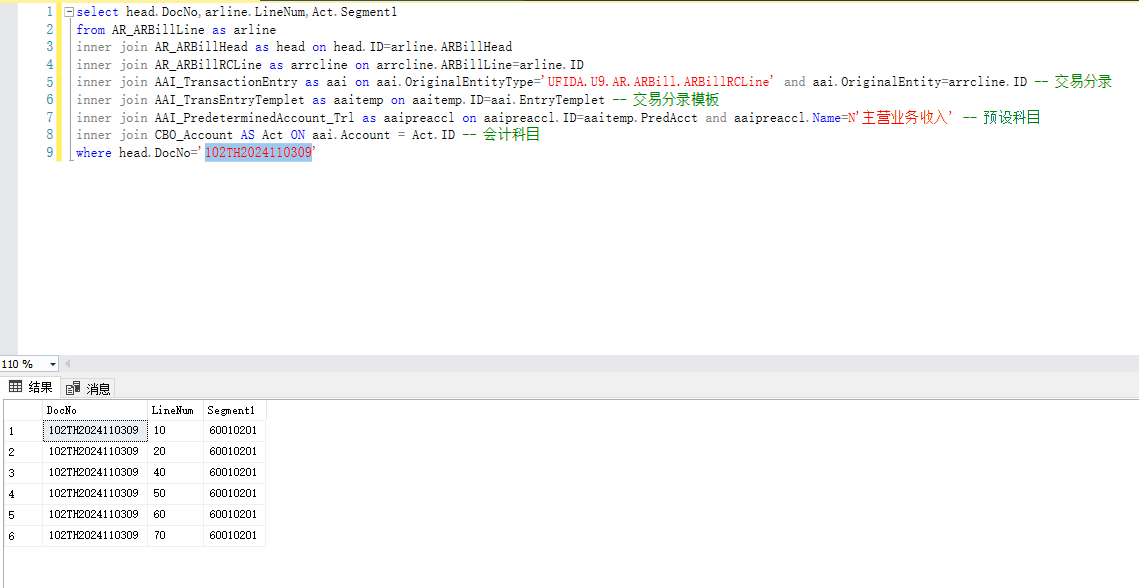
【059】应收单交易分录【主营业务收入】 获取应收单行的预设科目=主营业务收入的会计科目查询SQL语句select head.DocNo,arline.LineNum,Act.Segment1 from AR_ARBillLine as arline inner join AR_ARBillHead as head on head.ID=arline.ARBillHead inner join AR_ARBillRCLine as arrcline on arrcline.ARBillLine=arline.ID inner join AAI_TransactionEntry as aai on aai.OriginalEntityType='UFIDA.U9.AR.ARBill.ARBillRCLine' and aai.OriginalEntity=arrcline.ID -- 交易分录 inner join AAI_TransEntryTemplet as aaitemp on aaitemp.ID=aai.EntryTemplet -- 交易分录模板 inner join AAI_PredeterminedAccount_Trl as aaipreaccl on aaipreaccl.ID=aaitemp.PredAcct and aaipreaccl.Name=N'主营业务收入' -- 预设科目 inner join CBO_Account AS Act ON aai.Account = Act.ID -- 会计科目 where head.DocNo='102TH2024110309'结果
-
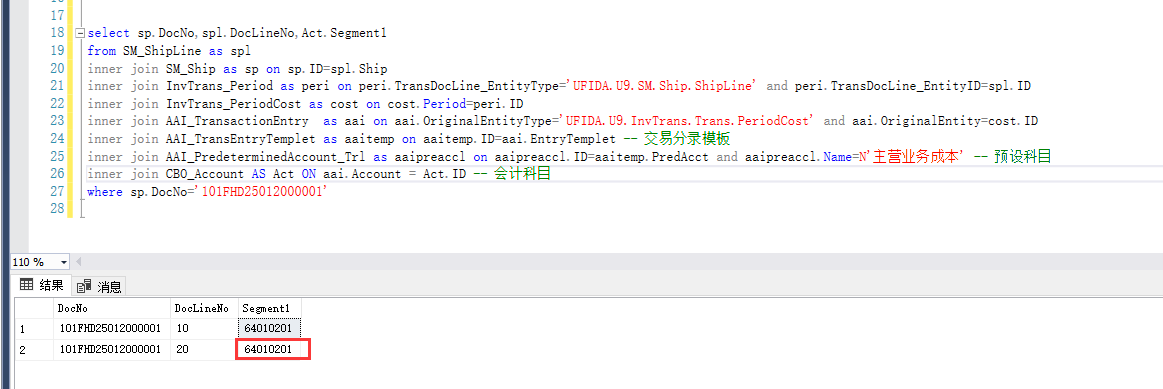
【058】出货单交易分录【主营业务成本】 获取出货单行的预设科目=主营业务成本的会计科目查询SQL语句select sp.DocNo,spl.DocLineNo,Act.Segment1 from SM_ShipLine as spl inner join SM_Ship as sp on sp.ID=spl.Ship inner join InvTrans_Period as peri on peri.TransDocLine_EntityType='UFIDA.U9.SM.Ship.ShipLine' and peri.TransDocLine_EntityID=spl.ID inner join InvTrans_PeriodCost as cost on cost.Period=peri.ID inner join AAI_TransactionEntry as aai on aai.OriginalEntityType='UFIDA.U9.InvTrans.Trans.PeriodCost' and aai.OriginalEntity=cost.ID inner join AAI_TransEntryTemplet as aaitemp on aaitemp.ID=aai.EntryTemplet -- 交易分录模板 inner join AAI_PredeterminedAccount_Trl as aaipreaccl on aaipreaccl.ID=aaitemp.PredAcct and aaipreaccl.Name=N'主营业务成本' -- 预设科目 inner join CBO_Account AS Act ON aai.Account = Act.ID -- 会计科目 where sp.DocNo='101FHD25012000001'结果
-
-
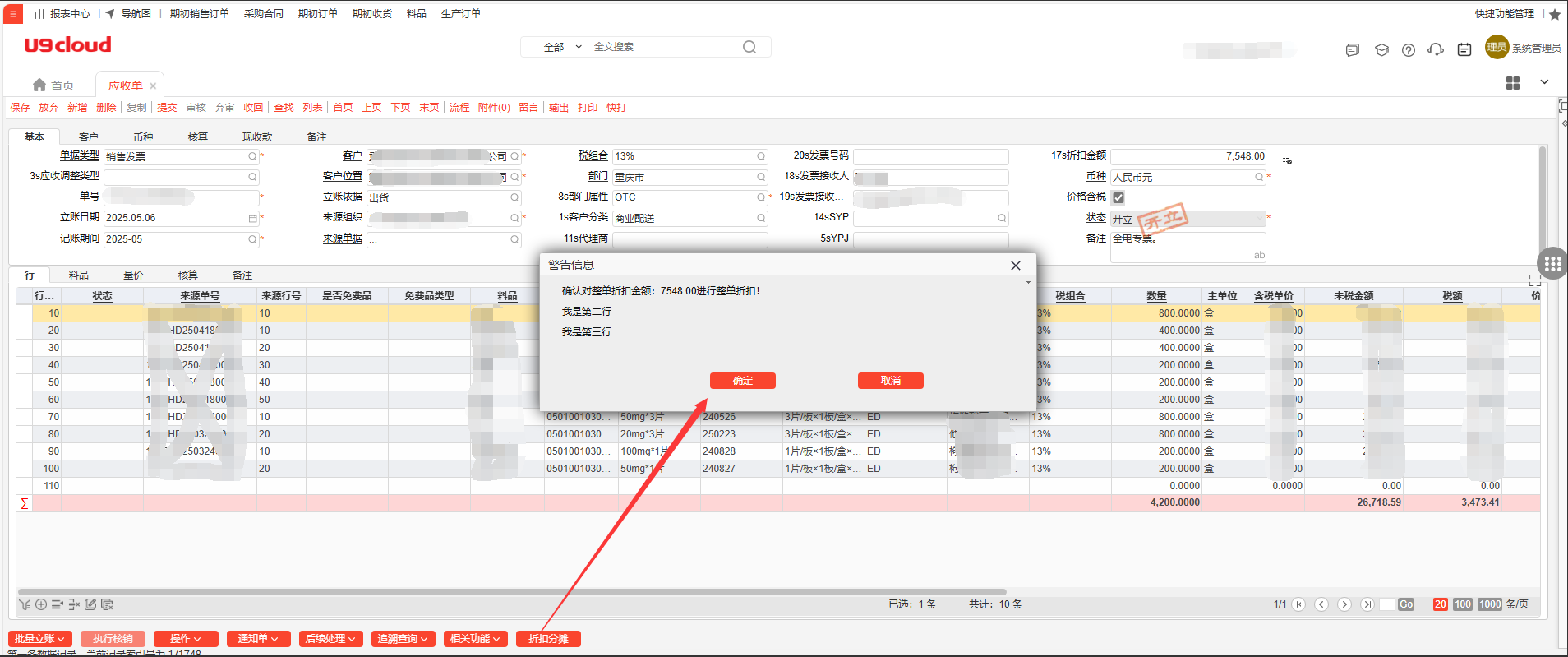
【056】使用警告弹窗提示用户信息 某些操作,如果有小部分信息缺失不影响逻辑,但是有些场景又必须要填写 遇到过很多次客户想能不能弹出警告提示一下,再进行一次确认动作 刚好在库存->转总账模块看到生成凭证有弹窗,特此记录如何使用U9系统的ShowMsg函数curPart是UI插件的IPart及其实现类如果不是UI插件,是webPart页面,直接用this即可 /// <summary> /// 弹出提示信息 /// </summary> /// <param name="targetType">触发类型,用于单个页面有多个弹窗的时候判断</param> /// <param name="errorList">提示信息,最好不超过4行</param> private void ShowMsg(string targetType, params string[] errorList) { if (errorList == null || errorList.Length == 0) return; string TaskID = curPart.TaskId.ToString(); if (curPart.CurrentState["ReMakePland"] != null) { curPart.CurrentState["ReMakePland"] = false; } NameValueCollection nameValues = new NameValueCollection(); curPart.CurrentState["ErrorString"] = errorList.ToList(); curPart.CurrentState["TargetType"] = targetType; curPart.ShowModalDialog("4034d041-4190-4eb8-9e0a-16a214370108", "", "600", "152", TaskID, nameValues, true, true); } BeforeRender处理点击确认的信息如果不是UI插件,是webPart页面,那在AfterUIModelBinding中处理 public override void BeforeRender(IPart Part, EventArgs args) { base.BeforeRender(Part, args); // ReMakePland=true就表示用户点击了确认 if (bool.TryParse(Part.CurrentState["ReMakePland"]?.ToString(), out bool reMakePland) && reMakePland) { // 如果插件只有一个弹窗可以不判断TargetType,但是TargetType最后也要=null string targetType = Part.CurrentState["TargetType"]?.ToString(); switch (targetType) { case "操作1": // do操作1的方法 break; case "操作2": // do操作2的方法 break; default: break; } Part.CurrentState["ReMakePland"] = null; Part.CurrentState["TargetType"] = null; } }弹窗效果图示提示信息最好不超过4行
-
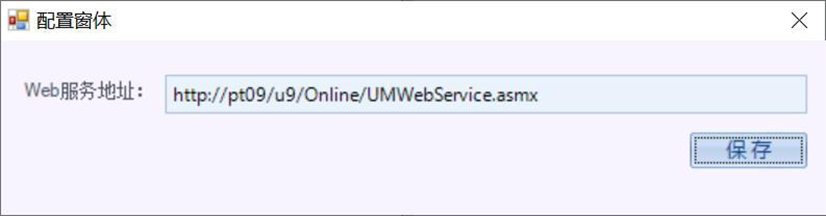
【055】UMTracer 效率分析 背景分析性能问题的难点无法直接在客户环境,获得量化的性能数据。本部可能无法重现问题。回传环境过程缓慢,由于客户的安全限制,甚至可能无法回传。受限于环境因素,客户回传的Portal可能仍然无法重现问题。 综上因素,导致性能问题的处理时间,大部分消耗在了问题重现及环境搭建上。因此U9 自己开发的一个效率分析工具,包含对代码执行方法、调用 堆 栈 及 SQL 的 抓 取 及 时 间 统 计 。 UMTracer的能力监听本地发出的Http请求,并可获取请求的如下信息:Http请求信息,包括耗时及请求上下行数据。监控方法的执行情况。监控SQL的执行情况。开发人员,可以调用UMTracer服务端接口,进行自己的代码监控。CodeProfiler.BeginExecute/EndExecuteSQLProfiler.BeginExecute/EndExecuteCode Profiler工具的特点是监控所有方法,分析时可以逐层展开确定最底层开销,UMTracer是更轻量级的核心方法调用监控,所以分析关注点也有所不同,建议关注:关注开销分布,Method/SQL的开销比例。对于SQL较高的案例,分析SQL执行时间及频度,并关注返回结果数。 对于Method较高的案例,关注调用逻辑合理性,以及重点方法的调用频度简单说,UMTracer集成了Fiddler,SqlProfiler和AQTime的核心功能。获取路径在 U9 及 U9CE 安 装 时 会 自 带 , 默 认 路 径 是 yonyou\U9CE\Portal\Tools\UMTracer New.zip。此工具直接在客户端使用,不必非要连接服务器。最新版本工具请前往U9Hub下载:https://u9hub.diwork.com/a/tools/down使用介绍配置及登录由于UMTracer 有过改版因此分为两种配置/登录方式老版本需要在工具-配置打开配置窗体进行配置,将 pt09 替换为服务器 IP,U9 代表的是版本,如果是 U9CE 那么要改为 U9C新版本需要输入 URL,然后通过用户账号进行登录。登录后可以在工具-重新登录启动及监听启动登录后再次点击启动控制台,其中开启详细跟踪是会抓取方法的调用堆栈,开启秒 表是控制台秒表启动,并不是勾选开启秒表才会记录时间。监听打开控制后会悬浮在最上层,此时需要打开 U9找到动作慢的界面,数据准 备不要一次执行太多,由于这个工具在收集四分钟时可能就解析不出来了。再有就 是使用这个工具由于在收集数据因此会导致当前操作慢一些,如客户说更慢了可以 向其说明。监测时先点击开始,等操作完成后点击结束,等待分析即可。)结果导出如要多次监测,那么需要先导出监测结果然后再将监测结果删除然后在工具-重新登录,然后再次启动控制台监测结果分析完成后会出现监测结果,选择耗时最长的查看性能分析,此时可以清楚的看到 SQL 的占比,如果 SQL 占比很高可以去查看是否可以优化 SQL,或添加索引。选中耗时的方法后下方会出现对应的方法调用过程,并且会出现每一步的耗时如图记录了多个插入后事件耗时,此时可以统计这个方法的总体耗时,通过统计可 以得到方法的总耗时,从而确认那个方法最耗时。从上到下查看相同的方法占时是否逐步增加,如果逐步增加那么需要查看方法每次 执行时执行的过程是否一致,如不一致那么要确认是否因为不一致的点导致的耗时 增加。如一致那么需要考虑是否可以减少方法的调用,如通过增加全局变量或线程 缓存。 查看耗时方法中那一步耗时需要再次展开,如图可以看到 Session.Commit 耗时, commit 要走 BE,调用过程为 OnSetDefaultValue-OnValidate-OnInserting/OnUpdating/ OnDeleting知道耗时方法可以通过查看附加信息来在哪里调用的,如图可以看出是 IssueDoc.UpdatePickIssueQtyWhenCreatDoc 方法中调用的 Commit。此时就需要查看 具体的代码查看是进行了什么处理,看是否可以进行优化,如单个提交的是否可以 改为一起提交,订单行上 OnInserted/OnUpdated/OnDeleted 单独提交的是否可以改 要一起讨论!在 SQL 视图中可以查看 SQL,通过对 SQL 排序可以找到耗时最大的 SQL,或找出执 行次数较多的 SQL,通过 SQL 可以找到对应的方法,找到对应的方法查看堆栈信息 然后查看具体代码调用是否可优化
-
【054】推式生单配置的目的单据部分实体无法选择 利用SQL新增推式生单配置的目的单据的实体记录U9C没有内置的话,Base_PushToDocTypeConfig表没有TargetEntity时,目的单据无法选择相对应的单据进行配置 比如想配置一个收货单转资产卡片的单据类型映射配置,但是无法选择资产卡片 在后台新增一条记录到Base_PushToDocTypeConfig的方式经测试有效,特此记录 declare @Application bigint -- 目的单据的所在应用ID declare @ID bigint=3009001001 -- 生单规则配置的ID declare @TargetEntity bigint -- 来源单据实体ID declare @SourceEntity bigint -- 目的单据实体ID declare @AttrExpression1 nvarchar(50) -- 属性表达式1 declare @AttrType1 nvarchar(50) -- 属性类型1 declare @UIParam1 nvarchar(50) -- UI参数1 declare @ParamName1 nvarchar(50) -- 参数名称1 declare @UserAttr1 nvarchar(50) -- 使用条件1 select @Application=ID from [Base_Application_Trl] where Name=N'固定资产' select @SourceEntity=A.[Local_ID] FROM UBF_MD_Class as A inner join [UBF_MD_Class_Trl] as A1 on (A1.SysMlFlag = 'zh-CN') and (A.[Local_ID] = A1.[Local_ID]) where A1.[DisplayName] = N'库存杂发单' select @TargetEntity=A.[Local_ID] FROM UBF_MD_Class as A inner join [UBF_MD_Class_Trl] as A1 on (A1.SysMlFlag = 'zh-CN') and (A.[Local_ID] = A1.[Local_ID]) where A1.[DisplayName] = N'资产卡片' -- 来源单据类型的一些绑定属性 select top 1 @AttrExpression1=AttrExpression1,@AttrType1=AttrType1,@UIParam1=UIParam1,@ParamName1=ParamName1,@UserAttr1=UserAttr1 from Base_PushToDocTypeConfig where SourceEntity=@SourceEntity and AttrExpression1='SrcDocType' and ParamName1='SrcDocType' delete Base_PushToDocTypeConfig where ID=@ID delete Base_PushToDocTypeConfig_Trl where ID=@ID -- UIParam1 来源单据类型的FormID -- TargetDocTypeReference 目的单据类型的FormID insert into Base_PushToDocTypeConfig(ID,CreatedOn,CreatedBy,SysVersion,Application,SourceEntity,TargetEntity,AttrExpression1,AttrType1,UIParam1,TargetDocTypeReference,ParamName1,UserAttr1) values(@ID,GETDATE(),'admin',0,@Application,@SourceEntity,@TargetEntity,@AttrExpression1,@AttrType1,@UIParam1,'354d46a6-cdcf-4624-864c-d5ff9a6a6830',@ParamName1,@UserAttr1) insert into Base_PushToDocTypeConfig_Trl(id,SysMLFlag,AttrName1) values(@ID,'zh-CN',N'来源单据类型')
-
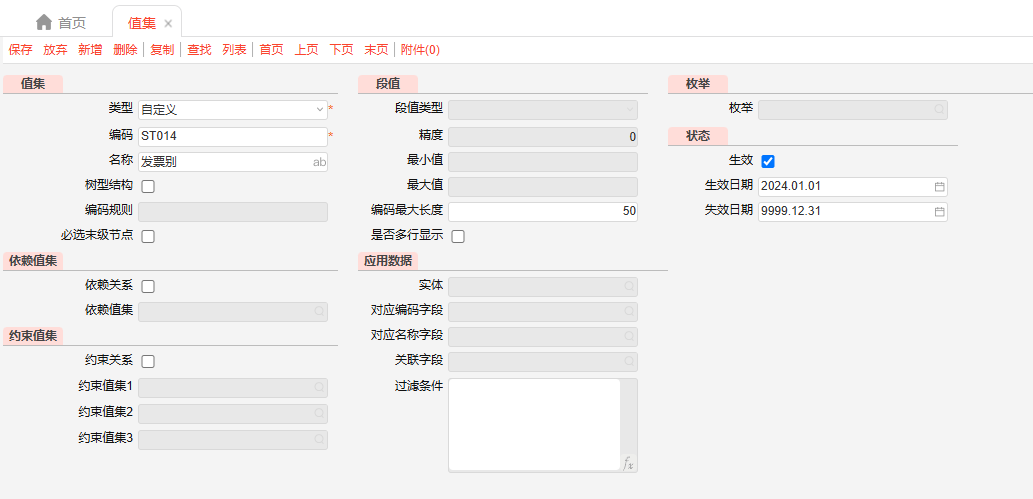
【053】自定义值集与实体值集互换 值集设置好之后,如果有单据引用了就不允许修改了,测试后台进行修改可行,特此记录 以朗圣应收单头的私有段15发票别为例,一开始设置的ST014为自定义值集值旧的值集值新增一个要替换的新的值集(记住值集编码)例如这里我想改成实体值集,编码为ST019数据库执行以下语句n.Code要等于新的值集编码'ST019',old.Code就是要修改的值集编码'ST014' sql语句中的old.xxx=n.xxx左右两边保持一致,这里只是展示了实体值集可能需要用到的字段复制 如果需要复制别的字段值过来,在查询方案的栏目中找到对应字段,然后复制一个赋值的语句(包括前面的,号),把左右两边的字段名更改为你要复制值得字段名即可UPDATE old SET old.ValidateType=n.ValidateType ,old.ValueType=n.ValueType ,old.EntityType=n.EntityType ,old.IDAttribute=n.IDAttribute ,old.CodeAttribute=n.CodeAttribute ,old.NameAttribute=n.NameAttribute ,old.Condition=n.Condition ,old.ConditionDisplayName=n.ConditionDisplayName ,old.OQL=n.OQL ,old.SQL=n.SQL ,old.DependantAttribute=n.DependantAttribute ,old.IsDependant=n.IsDependant ,old.DependantValueSet=n.DependantValueSet ,old.DependantDefaultValue=n.DependantDefaultValue FROM Base_ValueSetDef AS old INNER JOIN Base_ValueSetDef AS n ON n.Code = 'ST019' -- 新的值集,覆盖完之后删除 WHERE old.Code = 'ST014'; -- 要覆盖的值集执行SQL后的ST014检查引用单据能正确选择与保存应收单可以正确弹出选择,并且保存成功删除临时新增的值集值集'ST019'仅仅是为了能够取值覆盖到'ST014',用完检查引用单据无操作异常即可删除
-
【052】查找DataAccess的DLL路径获取密码 查找DataAccess的DLL路径DnSpy直接附加Portal/bin、Portal/ApplicationServer/bin下面的UFSoft.UBF.Util.DataAccess.dll是不行的,调试不会进断点确定U9C应用程序池是否开启32位启用32位程序=False,文件夹名为C:\Windows\Microsoft.NET\Framework64 启用32位程序=True,文件夹名为C:\Windows\Microsoft.NET\Framework查看U9C应用程序池.NET Framework 版本C:\Windows\Microsoft.NET\Framework64\<版本号>\Temporary ASP.NET Files 如下图,版本号为:v4.0.30319,那缓存目录就是 C:\Windows\Microsoft.NET\Framework64\v4.0.30319\Temporary ASP.NET Files进入IIS的u9c缓存目录进入C:\Windows\Microsoft.NET\Framework64\v4.0.30319\Temporary ASP.NET Files\u9c查找UFSoft.UBF.Util.DataAccess.dll在u9c目录下查找UFSoft.UBF.Util.DataAccess.dll 找到后右键->打开文件所在的位置,可定位到dll的具体目录 DnSpy附加的时候,就是附加这个目录下的dll调试获取数据库连接串附加上面找到的UFSoft.UBF.Util.DataAccess.dll断点到DataAccessor.GetConn先找到方法DataAccessor.GetConn,设置断点启动调试附加到进程启动调试登录U9C系统,进入断点登录U9C系统,进入断点后使用F11进入DatabaseManager.GetCurrentConnection方法中 然后F10到下一步,此时conn已赋值展开底部conn,其中ConnectionString即为数据库连接串 可以看到我本地的数据库连接密码为:123456